
• ECommerce Search Engine Optimization: The 2026 Guide to Inclusive Growth

    ECommerce Search Engine Optimization: The 2026 Guide to Inclusive Growth

    Did you know that 77% of all website accessibility lawsuits now specifically target eCommerce businesses? For many stakeholders, the persistent threat of an ADA demand letter is just as taxing as the struggle to reverse stagnant organic traffic. You likely recognize that your digital presence must be both highly visible and legally sound, yet the technical complexity of WCAG 2.2 standards often feels like a barrier to the very growth you’re trying to achieve.

    This guide provides a strategic roadmap for eCommerce search engine optimization in an era where inclusive search efficiency is the new benchmark for success. We’ll show you how to align your store with modern accessibility standards to shield your brand from litigation while simultaneously capturing 100% of your potential market. You will learn how to navigate the March and May 2026 Google Core Updates by implementing professional remediation that turns regulatory compliance into a powerful engine for sustainable, top-tier rankings. By the end of this article, you’ll understand how to transform technical requirements into a protective foundation for your brand’s future.

    Key Takeaways

    • Understand why modern eCommerce search engine optimization requires a shift from simple keyword targeting to a holistic model of inclusive search efficiency that prioritizes user intent and technical compliance.
    • Discover how aligning your technical SEO with WCAG 2.2 standards creates a synergistic effect that improves Core Web Vitals and ensures your site is indexable for both search bots and assistive devices.
    • Learn the critical distinctions between B2B and B2C search intent to ensure your content strategy addresses the specific informational needs of organizational stakeholders versus individual consumers.
    • Implement a remediation-first growth strategy that identifies and corrects accessibility barriers before scaling traffic, protecting your brand from legal liability while securing long-term rankings.
    • Explore how ongoing monitoring tools like a11y.Radar can maintain your competitive edge by preventing new accessibility issues from compromising your SEO gains and site performance.

    Table of Contents

    • The Evolution of eCommerce Search Engine Optimization in 2026
    • Building a Foundation: Technical SEO and Accessibility Synergy
    • Strategic Comparison: B2B vs. B2C eCommerce SEO Models
    • Execution: A Remediation-Led Strategy for Sustainable Growth
    • The 216digital Advantage: Protecting and Growing Your Storefront

    The Evolution of eCommerce Search Engine Optimization in 2026

    In 2026, search engine optimization (SEO) is no longer an isolated marketing task. It’s the critical intersection of brand visibility, digital usability, and legal liability. Traditional methods that relied on keyword density have been replaced by sophisticated semantic relevance and intent matching. Search engines now prioritize how well a store serves its entire audience, including those using assistive technologies. If your content doesn’t align with the specific intent of a query, no amount of technical “hacking” will secure a top position.

    As a business owner, you must adopt the role of the Authoritative Protector. This means your eCommerce search engine optimization strategy isn’t just about chasing traffic; it’s about guarding your brand against the rising tide of ADA demand letters and regulatory penalties. With the release of Google’s March and May 2026 Core Updates, the margin for technical error has vanished. If your site structure is fragmented or your data is poorly organized, you aren’t just losing rankings. You’re inviting litigation by failing to provide an equal experience for all users.

    The introduction of AI Overviews and the Universal Commerce Protocol has transformed the click-through landscape. To appear in these AI-generated answers, your store must provide structured, accessible data that machines can parse with 100% accuracy. This evolution demands a shift in how we view “optimization.” It’s no longer about winning a click at any cost; it’s about building a stable, inclusive storefront that regulators and search bots alike recognize as high-quality.

    The Shift from Clicks to Compliance

    Search engines now treat significant accessibility barriers as a primary indicator of poor user experience. When screen-reader users encounter broken navigation or unlabeled buttons, they bounce immediately. These high bounce rates signal to Google that your site is low-quality, leading to a steady decline in organic visibility. Inclusive SEO is the non-negotiable standard for eCommerce success in 2026, ensuring that your storefront remains reachable and usable for every potential customer.

    AI-Driven Search and the Importance of Clean Code

    Large Language Models (LLMs) crawl your site with the same logic as assistive devices. They rely on semantic HTML to understand product relationships and hierarchy. Clean code is no longer just a developer’s preference; it’s a dual-purpose requirement for both SEO performance and ADA necessity. By using proper ARIA labels and logical heading structures, you help AI search engines categorize your products while simultaneously meeting WCAG 2.2 conformance standards. When your code is clean, you remove the friction that prevents both AI and human users from completing a purchase.

    Building a Foundation: Technical SEO and Accessibility Synergy

    Technical health is the bedrock of any successful digital storefront. In 2026, Google’s algorithm treats accessibility as a direct proxy for user experience quality. If a search crawler cannot parse your navigation or a visually impaired shopper cannot interact with your checkout, your store will not achieve its ranking potential. This is the “Inclusive SEO” framework in action. It operates on a simple, high-stakes principle: if a bot can’t read it, and a disabled user can’t read it, Google won’t rank it. Maintaining this foundation also requires consistent uptime; small business owners can use sitesentry-8.polsia.app to monitor their site’s availability and ensure it remains reachable for all visitors. Successful eCommerce search engine optimization now requires a unified approach where technical remediation and ranking growth happen simultaneously.

    You must avoid the temptation of “Quick-Fix” accessibility overlays. These JavaScript-based wrappers often block search bots from indexing your actual content while creating a fragmented, frustrating experience for users with assistive devices. These tools don’t provide true WCAG conformance; instead, they often destroy technical SEO performance by increasing page load times and obscuring the clean code search engines crave. A resilient site architecture serves two masters: it optimizes your crawl budget so bots can find every SKU, and it provides logical navigation that guides every human user toward a conversion.

    Core Web Vitals and WCAG 2.2 Alignment

    The overlap between Core Web Vitals and accessibility is undeniable. Improving Interaction to Next Paint (INP) is a primary SEO goal, yet it also directly benefits keyboard-only users who rely on rapid feedback to navigate. Similarly, visual stability (measured by Cumulative Layout Shift) is a cognitive accessibility requirement. When elements jump on a screen, they cause confusion for users with vestibular disorders and trigger ranking penalties from Google. Aligning these metrics ensures your site is both fast and stable. For those seeking deep-dive protection, our ADA web accessibility compliance services provide the technical oversight needed to bridge these gaps.

    Structured Data for Inclusive Search

    Structured data acts as a vital bridge between accessibility labels and search engine understanding. By using Schema.org, you provide rich context for products, reviews, and real-time availability that AI-driven search engines use to populate results. This structured approach helps machines interpret the purpose of every element on your page. During a technical audit, implementing a proper aria label strategy is essential. These labels tell both screen readers and search bots exactly what a button or link does, ensuring your site is fully understood by all visitors. Our team can help you identify these critical gaps during a professional technical remediation audit.

    Strategic Comparison: B2B vs. B2C eCommerce SEO Models

    While the fundamental mechanics of eCommerce search engine optimization remain consistent across industries, the execution diverges sharply when comparing B2B and B2C models. In the B2C sector, you’re targeting the individual consumer whose intent is often transactional and driven by immediate emotional or functional needs. Conversely, B2B models focus on the organizational stakeholder. These users are typically part of a multi-layered decision-making unit where search intent is rooted in technical specifications, long-term compatibility, and risk reduction. Your strategy must adapt to these distinct psychological profiles to capture and convert high-value traffic.

    B2B landing pages face significantly higher scrutiny for ADA compliance than their B2C counterparts. This isn’t merely a best practice; it’s a requirement driven by government and corporate procurement rules. Large organizations and public entities often mandate that their vendors meet specific WCAG 2.2 standards before a contract can even be considered. If your B2B portal isn’t accessible, you’re effectively locking your brand out of enterprise-level opportunities. In both models, trust signals such as security certifications, accessibility conformance statements, and verified reviews act as vital differentiators. They reassure the buyer that your storefront is stable, professional, and built for long-term partnership.

    The B2B Buying Cycle and Content Strategy

    B2B search intent is rarely satisfied by a single visit. It requires mapping content to a complex decision-making process that spans from initial research to final procurement. This is why PPC management for B2B brands must align perfectly with your organic SEO to capture leads at every stage of the funnel while mitigating the risk of fragmented messaging. B2B spec-sheet SEO thrives when technical documentation is delivered through accessible PDF and table formatting, ensuring that complex data is indexable by bots and readable by assistive technologies with equal precision.

    CRO for All Users: The B2C Conversion Engine

    In the B2C space, the conversion engine relies on removing every possible point of friction. Accessible checkout experiences are a primary tool for reducing cart abandonment, as they ensure that shoppers using screen readers don’t encounter technical roadblocks at the most critical moment. Inclusive design also has a measurable impact on “Time on Page” and “Conversion Rate” metrics, as a more usable site naturally encourages deeper exploration. With mobile commerce expected to account for nearly 60% of all online retail sales in 2026, B2C brands must prioritize mobile-first accessibility to maintain search dominance and capture a share of the projected $1.38 trillion US eCommerce market.
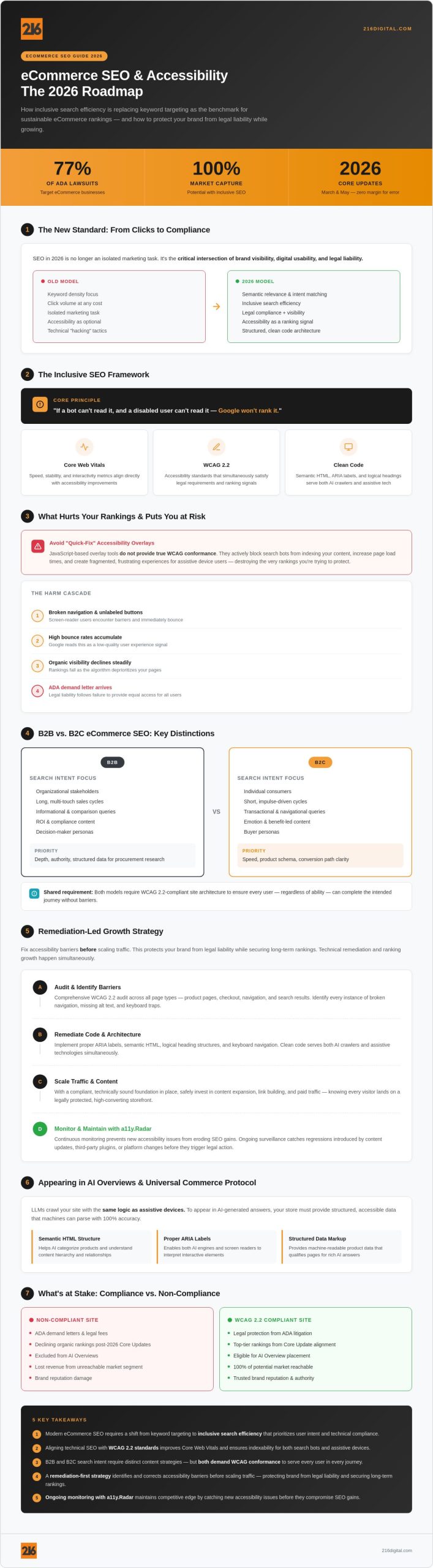
    ECommerce Search Engine Optimization: The 2026 Guide to Inclusive Growth

    Execution: A Remediation-Led Strategy for Sustainable Growth

    Successful execution begins with a fundamental shift in priorities. You must adopt a remediation-led approach to eCommerce search engine optimization. Chasing visibility without first securing your technical foundation is a strategic error. Scaling traffic to a storefront with significant accessibility barriers effectively invites legal scrutiny by increasing the visibility of your compliance gaps. By fixing these barriers first, you create a stable environment where your SEO gains are protected from the sudden impact of regulatory enforcement or manual penalties. Visibility requires stability.

    Conducting a dual-purpose audit allows you to identify ranking gaps and compliance failures in a single, efficient process. This methodical oversight ensures that every technical correction serves both a search bot and a human user. When performing keyword research, you should look beyond high-volume terms to capture “Inclusive Intent.” These are queries from users seeking specific accessible features or those using assistive technologies. This targeted strategy builds deep authority in niche segments that competitors often ignore, reinforcing the long-term stability of your eCommerce search engine optimization efforts.

    A dual-purpose audit identifies ranking gaps and compliance failures simultaneously. Your remediation checklist should include:

    • Checking for missing or non-descriptive ARIA labels on interactive elements.
    • Verifying that all navigation menus and checkout buttons are fully keyboard-accessible.
    • Analyzing page load speeds across mobile devices and assistive hardware.
    • Identifying unlinked or poorly structured product categories that hinder crawl budget.

    On-Page Optimization Beyond the Product Description

    On-page optimization in 2026 extends far beyond the product description. The strategic use of alt text for images is a prime example; it boosts your visibility in Image Search while ensuring WCAG compliance. Your heading structure (H1-H6) must also be logically ordered. This hierarchy acts as a map for screen readers and search crawlers alike. Descriptive anchor text is equally critical. Instead of generic “click here” links, use keyword-rich phrases that tell the user and the search engine exactly what to expect on the destination page.

    Risk-Aware Link Building

    Link building in this high-stakes environment requires a risk-aware mindset. Earning backlinks from high-authority, compliant domains signals to Google that your brand is a trusted entity. You must avoid toxic link schemes that offer quick results but lead to devastating manual penalties. Instead, focus on PR and inclusive brand storytelling. When you share how your brand prioritizes accessibility, you earn natural, high-quality links that strengthen your domain authority and protect your long-term growth. If you’re ready to secure your storefront with a strategy that balances growth and protection, explore our Professional SEO and remediation services today.

    The 216digital Advantage: Protecting and Growing Your Storefront

    Choosing a partner for your digital growth requires more than just finding a marketing agency. In 2026, the stakes are too high for a fragmented strategy. At 216digital, we integrate professional SEO with high-stakes Phase 1 Risk Mitigation to ensure your brand is both visible and protected. We specialize in BigCommerce and Shopify development, providing a unified approach that addresses the technical requirements of search engines and the regulatory expectations of the Department of Justice. Our team acts as your Authoritative Protector, standing between your business and the external threats that often follow rapid organic scaling.

    True WCAG 2.2 conformance cannot be achieved through automated shortcuts or temporary overlays. It requires manual remediation by experts who understand the nuances of accessible code and user experience design. We perform deep-domain corrections that fix accessibility barriers at the root, creating a stable foundation for your eCommerce search engine optimization efforts. By aligning your storefront with these rigorous standards, we help you dominate search results while securing the peace of mind that comes from professional excellence and legal stewardship.

    a11y.Radar for SEO Stability

    Growth often leads to “compliance drift.” As you add new SKUs, update blog content, or modify your site architecture, new accessibility barriers can emerge and compromise your SEO health. Our proprietary platform, a11y.Radar, provides ongoing website accessibility monitoring to prevent these issues from taking root. These recurring technical checks maintain a clean SEO profile, ensuring that your site remains indexable and compliant even as your catalog expands. This continuous oversight is the only way to protect your long-term rankings in an evolving regulatory environment.

    Choosing a Strategic Partner for 2026

    You need a strategic guide that speaks the language of both Google’s algorithms and modern legal frameworks. A unified approach to design, development, and eCommerce search engine optimization ensures that no part of your digital presence is left vulnerable. When your marketing team and your technical remediation specialists operate as one, you eliminate the friction that slows down growth and creates liability. We invite you to move beyond basic compliance and embrace a strategy that values integrity and thoroughness. Contact 216digital today to protect your business while aggressively growing your reach in the 2026 marketplace.

    Securing Your Market Dominance through Inclusive Search

    The 2026 digital landscape demands a fundamental shift from aggressive traffic acquisition to a strategy rooted in technical stability and proactive stewardship. You’ve seen how the intersection of technical health and WCAG 2.2 conformance creates a superior user experience that search engines are now hard-wired to reward. By prioritizing a remediation-first approach, you don’t just shield your brand from the persistent threat of ADA litigation; you also ensure that every potential customer can navigate your storefront with ease.

    Effective eCommerce search engine optimization is no longer a one-time project but a continuous commitment to professional excellence. Founded in 1999, 216digital brings decades of deep-domain expertise in BigCommerce and Shopify development to your corner. Our proprietary a11y.Radar platform provides the ongoing oversight necessary to maintain your rankings and compliance in an ever-shifting regulatory environment. It’s time to transform your technical requirements into a long-term competitive advantage. Protect your brand and grow your organic traffic with 216digital’s Inclusive SEO services.

    We look forward to helping you build a resilient, accessible, and high-performing digital future that stands the test of time.

    Frequently Asked Questions

    What is the difference between eCommerce SEO and traditional SEO?

    eCommerce SEO focuses on optimizing product pages, category hierarchies, and transactional intent, while traditional SEO often targets informational content and brand awareness. In an online store, success depends on managing large volumes of SKUs and complex faceted navigation. This requires a deeper focus on technical site architecture and structured data to ensure search engines can crawl and index every product efficiently without wasting crawl budget.

    How does web accessibility affect my eCommerce search rankings?

    Web accessibility directly influences your rankings by improving user experience metrics that Google uses as primary quality signals. When your site is accessible, you reduce bounce rates from users on assistive devices and improve Interaction to Next Paint (INP) scores. Google’s 2026 algorithm updates prioritize sites that provide a stable, usable environment for all shoppers, meaning a non-compliant site will likely face a steady decline in organic visibility.

    Is WCAG 2.2 compliance mandatory for eCommerce websites in 2026?

    Yes, WCAG 2.2 is the recognized legal and technical standard for eCommerce businesses operating in the U.S. and European markets. While the ADA doesn’t explicitly name WCAG in its original text, the Department of Justice and recent court rulings consistently use these guidelines to determine digital accessibility. Failing to meet these standards exposes your brand to significant legal risks and potential exclusion from government or corporate procurement contracts.

    Can I use an accessibility overlay to improve my SEO?

    No, accessibility overlays typically harm your SEO by adding heavy JavaScript that slows down page load speeds and obscures clean code from search bots. These quick-fix tools don’t provide true WCAG conformance and often create a fragmented experience for screen-reader users. To achieve sustainable eCommerce search engine optimization, you must implement manual remediation that fixes accessibility barriers at the code level rather than hiding them behind a script.

    How long does it take to see results from an eCommerce SEO campaign?

    Most stores begin to see measurable shifts in organic traffic and keyword rankings within three to six months of implementing a comprehensive strategy. The timeline depends on your current technical health and the competitiveness of your niche. If your campaign begins with a remediation-led approach to fix critical accessibility and indexation gaps, you’ll often see improved crawl efficiency and ranking stability much sooner than through content updates alone.

    Does alt text really help with SEO rankings?

    Descriptive alt text is a powerful tool that improves your visibility in Image Search while fulfilling a core WCAG requirement. It provides search engines with context about the visual content of your product pages, helping them understand what you sell. When you use keyword-rich alt text, you increase the chances of your products appearing in visual search results, which is a critical traffic driver for eCommerce search engine optimization in 2026.

    What are the biggest technical SEO challenges for large eCommerce stores?

    Managing crawl budget and preventing duplicate content through faceted navigation represent the most significant technical hurdles for large storefronts. As your catalog grows, search bots can get lost in millions of filter combinations. This leads to poor indexation of key product pages. You must use canonical tags and structured data correctly to guide crawlers toward your most valuable content while ensuring the site architecture remains logically organized for both machines and human users.

    How do I balance SEO keyword needs with accessible design?

    You can balance these needs by integrating keywords into semantic HTML elements like headings and descriptive anchor text that aid navigation. Accessible design and SEO are naturally aligned; both prioritize clarity and logical structure. Instead of stuffing keywords into hidden areas, use them to create clear, descriptive labels that tell a screen-reader user and a search bot exactly what a page or link contains for the visitor.

    SEO Team

    July 17, 2026
    Web Accessibility Remediation
    ADA Compliance, B2B SEO, eCommerce SEO, Google Core Update, Inclusive Search, SEO Strategy, Technical SEO, WCAG 2.2, Website Accessibility
  • Accessibility Audit for Small Business: The 2026 Compliance Checklist

    Accessibility Audit for Small Business: The 2026 Compliance Checklist

    With federal ADA website accessibility lawsuits projected to surpass 6,000 in 2026, the risk of receiving a demand letter is no longer a “what if” scenario for growing companies. It’s understandable if you feel overwhelmed by technical jargon like ARIA labels or the nuances of WCAG 2.2 standards. Most owners recognize that their digital presence must be inclusive, yet the fear of high-priced enterprise audits often leads to costly inaction. Conducting an accessibility audit for small business doesn’t have to be a budget-breaking ordeal; it’s a critical step in the proactive stewardship of your brand and its digital longevity.

    We’re here to bridge the gap between complex regulatory requirements and practical business operations. This guide provides a comprehensive roadmap to help you identify digital barriers, mitigate legal risks, and achieve WCAG 2.2 conformance without the enterprise price tag. You’ll gain a prioritized checklist of what to fix first, ensuring your website serves every customer while providing you with much-needed legal peace of mind. We’ll examine the essential compliance markers for 2026 and outline a step-by-step audit process designed specifically for lean, high-growth teams.

    Key Takeaways

    • Understand why the 2026 legal landscape makes digital accessibility a high-stakes requirement for small businesses rather than an optional enhancement.
    • Learn how to execute a cost-effective accessibility audit for small business using the “mini-audit” strategy to identify critical barriers without an enterprise-level budget.
    • Discover the essential steps of a technical audit, from running automated scans to performing manual keyboard navigation tests on high-traffic pages.
    • Identify how to prioritize remediation by focusing on “Critical” blockers in the checkout and contact processes to maximize immediate risk mitigation.
    • Recognize the limitations of automated overlays and why ongoing monitoring is vital for maintaining long-term WCAG 2.2 conformance.

    Table of Contents

    • Why Small Businesses Need a Digital Accessibility Audit in 2026
    • Scoping Your Audit: The 'Mini-Audit' Strategy for Small Budgets
    • The Small Business Accessibility Audit Checklist
    • Prioritizing Remediation and Avoiding the 'Overlay' Trap
    • Next Steps: Professional Audits vs. DIY

    Why Small Businesses Need a Digital Accessibility Audit in 2026

    An accessibility audit for small business functions as a technical and legal health check for your digital presence. It provides a comprehensive analysis of how well your website aligns with modern standards, identifying barriers that prevent users with disabilities from interacting with your brand. In 2026, the legal landscape for small businesses has become significantly more volatile. Plaintiffs’ firms now utilize sophisticated automated tools to perform “surf-by” scans, seeking out easy targets for ADA Title III litigation. This shift means that smaller websites are no longer flying under the radar; they are often the primary focus of aggressive demand letter campaigns.

    To defend your business effectively, you must align with the Web Content Accessibility Guidelines (WCAG) 2.2, which is currently recognized as the definitive technical standard for digital inclusion. A proactive accessibility audit for small business allows you to adopt the mindset of an authoritative protector. Instead of waiting for a legal threat to arrive, you take stewardship of your digital environment. This strategy mitigates risk and ensures that your site remains a stable, welcoming platform for all users. It’s a necessary step for any business that values long term stability over the gamble of non-compliance.

    The Hidden Costs of Non-Compliance

    The financial impact of a single ADA demand letter often dwarfs the cost of a proactive audit. Verified data suggests that out of court settlements typically range from $5,000 to $25,000, excluding the additional costs of emergency remediation and legal fees. However, the damage extends beyond your bank account. With one in four Americans living with a disability, an inaccessible website alienates a massive portion of your potential customer base. This exclusion creates lasting reputational harm that is difficult to repair. Additionally, businesses that fail to meet Section 508 requirements risk losing eligibility for state and federal contracts, closing off vital revenue streams that you can’t afford to lose.

    The ROI of an Accessible Website

    Accessibility is a strategic growth lever rather than a mere compliance burden. Improvements made during an audit directly enhance your eCommerce search engine optimization by creating cleaner code and better site structure. Search engines reward websites that provide a clear, logical experience for all users, which is the core tenet of Web accessibility. There is also a significant overlap between accessible design and a high performing mobile user experience. Digital inclusion serves as a vital driver for broader market reach by removing the friction that prevents billions of people from completing a purchase. When you remove barriers, you don’t just avoid lawsuits; you open your doors to the 1.3 billion people globally who live with disabilities.

    Scoping Your Audit: The ‘Mini-Audit’ Strategy for Small Budgets

    A comprehensive accessibility audit for small business doesn’t require a page-by-page inspection of your entire site. If you manage a website with hundreds of entries, auditing every URL is an inefficient use of resources that delays critical remediation. Instead, we utilize a “representative sampling” approach. This strategy identifies unique page templates that share the same underlying code. By correcting a single header or navigation template, you often resolve accessibility failures across hundreds of dynamic pages simultaneously. It’s a method that prioritizes speed and efficiency over redundant data collection.

    This methodical scoping is the cornerstone of 216digital’s Phase 1 Risk Mitigation approach. It focuses your budget where it matters most: on the pages that drive conversions and carry the highest legal risk. By prioritizing high-traffic and high-conversion paths, you create a protective shield around your most valuable digital assets. This targeted focus ensures you’re addressing the barriers most likely to trigger a demand letter while building a foundation for broader conformance.

    Identifying High-Risk Templates

    Templates act as the skeleton of your site. You should focus your audit on the homepage, the “Contact Us” page, and any area where users must interact with forms. Implementing accessible navigation design patterns ensures that users can move through these critical paths without friction. For eCommerce businesses, the product gallery, cart, and checkout flow represent the highest risk areas. A single template fix in the checkout process can solve issues for every product you sell, providing immediate relief from potential liability.

    Setting Your Conformance Goal: WCAG 2.2 Level AA

    Your audit must aim for a specific benchmark to be effective. The Web Accessibility Initiative (WAI) provides the framework for these standards. While Level A is the absolute minimum, it rarely offers sufficient legal protection. Conversely, Level AAA is often technically impractical for standard commercial sites. WCAG 2.2 Level AA remains the industry “safe harbor” and the de facto standard used in most litigation settlements. This level of conformance balances rigorous inclusion with technical feasibility. For a deeper look at specific success criteria, you can consult our guide on the web content accessibility guidelines wcag.

    This targeted approach ensures your accessibility audit for small business remains cost-effective while delivering maximum protection. If you’re ready to begin identifying these vulnerabilities, reviewing accessible navigation design patterns is an excellent starting point for your remediation journey.

    The Small Business Accessibility Audit Checklist

    Executing an accessibility audit for small business requires a systematic approach that combines automated efficiency with manual precision. This checklist serves as your tactical roadmap for identifying the most common digital barriers that trigger legal scrutiny. By following these five steps, you can begin the process of aligning your website with WCAG 2.2 standards and safeguarding your business against potential claims.

    • Step 1: Run an automated scan. Utilize industry-standard tools like a11y.Radar to identify low-hanging fruit such as missing tags or broken links.
    • Step 2: Perform keyboard-only navigation. Disconnect your mouse and attempt to navigate your site using only the Tab, Enter, and Arrow keys. If you cannot reach a link or button, neither can a user with motor impairments.
    • Step 3: Check color contrast ratios. Ensure your text stands out clearly against its background. The minimum requirement for standard text is a ratio of 4.5:1 to maintain readability for users with low vision.
    • Step 4: Verify descriptive alt-text. Every image must have an “alt” attribute that describes its purpose to screen reader users. Avoid keyword stuffing; focus on the context of the image.
    • Step 5: Test form fields and labels. Every input field, from your search bar to your checkout form, needs a clear, persistent label and specific error messaging that guides the user toward a correction.

    Automated Testing: The Fast First Pass

    Automated tools are indispensable for high-speed data collection, yet they only catch approximately 30-40% of accessibility barriers. These scanners excel at detecting missing code but often generate “false positives” that require human interpretation. For instance, a tool might flag a missing label that is actually handled by a different technical attribute. Because your website is dynamic, a one-time scan isn’t enough. Implementing ongoing website accessibility monitoring ensures that new content doesn’t introduce fresh vulnerabilities after your initial accessibility audit for small business is complete.

    Manual Testing: Where the Real Protection Happens

    The most critical vulnerabilities are often invisible to software. A simple “Tab-key” test reveals whether your site provides visible focus indicators, which are the glowing outlines that show keyboard users where they are on a page. Without these, a user is essentially navigating in the dark. Automated tools also cannot determine if your alt-text is helpful or merely nonsensical. They can see that text exists, but they can’t judge its quality or relevance to the user experience. Automated scans find the errors, but manual audits find the barriers.

    Accessibility Audit for Small Business: The 2026 Compliance Checklist

    Prioritizing Remediation and Avoiding the ‘Overlay’ Trap

    Once you complete an accessibility audit for small business, the resulting report often contains dozens of technical failures. Attempting to fix every issue simultaneously is a strategic error that leads to messy, incomplete remediation. Instead, you must categorize findings based on their impact on the user and the associated legal risk. We recommend a three-tiered priority system to guide your efforts. This structured approach ensures that your limited resources are deployed where they provide the most immediate protection.

    • Critical: These are barriers that completely block a user from completing a task. If a customer cannot click “Submit” on a contact form or “Place Order” in the checkout, your business is at immediate risk of a demand letter.
    • Serious: These issues make usage difficult but not impossible. Examples include missing headings that hinder navigation or form fields that lack clear error descriptions.
    • Moderate: These are nuisance issues that affect the overall experience but don’t typically prevent a transaction. A low-contrast footer link or a decorative image with redundant alt-text falls into this category.

    Prioritizing the checkout flow and lead generation forms offers the fastest path to risk mitigation. A compliant homepage is useless if a user with a disability is blocked at the final step of the customer journey. By focusing on these high-conversion areas first, you protect your revenue while demonstrating a good-faith effort toward full conformance.

    Why Overlays Are Not an Audit Solution

    Many small business owners are tempted by accessibility overlays that promise instant compliance with a single line of code. These plugins are often marketed as a “quick fix,” yet they frequently increase your legal exposure. Overlays function as a secondary layer that often interferes with actual assistive technology like JAWS or NVDA screen readers. They don’t fix the underlying source code, meaning the core barriers remain. In 2025, 22.64% of website accessibility lawsuits were filed against companies that already had an overlay installed. Courts increasingly view these tools as an admission of non-compliance rather than a valid defense. True protection requires manual remediation through professional ADA web accessibility compliance services.

    Training Your Team for Sustainable Compliance

    An audit provides a snapshot of your website at a specific moment in time. However, digital compliance is not a “one and done” task. Every time your team uploads a new blog post, adds a product, or updates a navigation menu, they risk introducing new barriers. To maintain the findings of your accessibility audit for small business, you must incorporate inclusive standards into your standard publishing workflow. This includes digital accessibility training for developers and content creators to ensure they understand how to write descriptive alt-text and maintain proper heading structures. If you need expert guidance to build this long-term roadmap, our team is ready to assist with ADA risk mitigation strategies tailored to your specific eCommerce platform.

    Next Steps: Professional Audits vs. DIY

    Deciding between a self-managed approach and professional intervention is a calculation of risk tolerance and technical complexity. For a very small, static site with minimal user interaction, a DIY “gut check” using the checklist provided in the previous sections can help you identify basic failures. This preliminary review is a useful starting point for owners who need to understand their current baseline. However, if you manage a complex eCommerce platform or have already been served a demand letter, the stakes are far too high for a manual, solo effort. An incomplete accessibility audit for small business often creates a false sense of security while leaving high-risk legal vulnerabilities completely exposed.

    Our Phase 1 Risk Mitigation strategy is designed to close these gaps immediately. We provide the professional oversight necessary to shield your business from the predatory litigation trends of 2026. Once we establish a baseline of conformance, our proprietary a11y.Radar monitoring platform takes over. This system ensures the long-term integrity of your audit findings by scanning for new barriers as your site evolves. It acts as a vigilant protector, standing between your digital presence and the threat of new compliance failures.

    What to Look for in an Audit Partner

    Selecting a partner requires a focus on technical depth and industry-specific expertise. You should insist on manual testing performed by seasoned experts who understand the nuances of assistive technology. Automated reports alone are insufficient for legal defense. It’s also vital to find a partner who understands Shopify ADA compliance and the specific code structures of other major eCommerce platforms. The final audit report must be more than a list of errors. It should provide your developers with clear, actionable, code-level instructions to ensure remediation is both accurate and permanent. This level of detail removes the guesswork that often leads to repeated failures.

    Securing Your Digital Future

    An accessibility audit for small business is an essential investment in your brand’s resilience and long-term stability. Proactive stewardship is always more cost-effective than the frantic scramble of a reactive legal defense. By removing digital barriers today, you demonstrate a commitment to inclusion that resonates with 16% of the global population. This isn’t just about avoiding a lawsuit; it’s about opening your doors to every potential customer. Don’t wait for a legal challenge to recognize the value of your users. Take the lead by securing your digital storefront against the regulatory pressures of tomorrow. Contact 216digital for a professional accessibility audit evaluation.

    Future-Proof Your Digital Presence with Strategic Compliance

    The 2026 legal landscape demands more than just a reactive response to digital barriers. By implementing a targeted accessibility audit for small business, you transition from a position of vulnerability to one of proactive stewardship. You’ve learned that true protection requires moving beyond the “overlay” trap and focusing your remediation efforts on high-conversion templates like your checkout and contact forms. This methodical approach ensures that your limited resources are deployed where they provide the most significant reduction in liability.

    Professional oversight is the only way to achieve lasting peace of mind. Our Phase 1 Risk Mitigation strategies provide the immediate legal shielding your brand requires, while our a11y.Radar platform offers the ongoing monitoring needed to maintain your audit results over time. With expert WCAG 2.2 Level AA guidance, you can confidently grow your business knowing your digital storefront is inclusive and secure. Secure your business with a professional accessibility audit from 216digital and take the first step toward a more resilient, accessible future for every customer.

    Frequently Asked Questions

    How much does a small business accessibility audit typically cost?

    A manual accessibility audit for a small business website typically costs between $1,500 and $5,000. This range covers the professional evaluation of your site’s code and user interface to identify specific legal and technical vulnerabilities. If you include the cost of developer remediation, the total investment often ranges from $1,500 to $7,500 depending on the complexity of your site’s architecture.

    Can I use a free tool to perform my own accessibility audit?

    You can use free automated tools for an initial “gut check,” but they only detect approximately 30% to 40% of potential barriers. These tools are excellent for catching missing alt-text or empty buttons, but they cannot judge the quality of your user experience. A comprehensive accessibility audit for small business requires manual testing to ensure that keyboard navigation and screen reader interactions function correctly in real-world scenarios.

    How long does it take to complete a full website accessibility audit?

    A professional audit typically takes between two and four weeks to complete from the initial scan to the final report. This timeline allows for a thorough manual review of your high-traffic templates and the documentation of specific remediation instructions. Complex eCommerce sites with custom checkout flows may require additional time to ensure every interactive element aligns with current standards.

    What is the difference between a WCAG audit and an ADA audit?

    The ADA is the federal law that requires businesses to provide accessible services, while WCAG provides the technical success criteria used to measure that accessibility. An accessibility audit for small business uses the Web Content Accessibility Guidelines (WCAG) 2.2 as the benchmark to determine if a site meets the legal requirements of the ADA. Essentially, WCAG tells you “how” to fix the site so that you are in alignment with the “what” required by the law.

    Will an accessibility audit improve my site’s Google ranking?

    Yes, the remediation steps following an audit directly support your search engine optimization. Google’s algorithms reward sites that provide a clear structure, descriptive metadata, and a high-quality user experience. By fixing heading hierarchies and adding descriptive alt-text, you are simultaneously making your site easier for search engines to crawl and index, which often leads to improved organic visibility.

    Do I need to audit my mobile app as well as my website?

    If your business offers a native mobile app, it must meet the same accessibility standards as your website. The Department of Justice has established clear deadlines for public entities to achieve mobile app accessibility by 2027 and 2028, and private businesses are increasingly held to these same standards in Title III litigation. Ensuring your app is inclusive is a vital part of a comprehensive risk mitigation strategy.

    What happens if my audit finds hundreds of errors I can’t afford to fix at once?

    You don’t have to fix every minor error immediately to reduce your legal risk. We recommend a phased approach that prioritizes “Critical” barriers in your checkout and contact forms first. Documenting this remediation roadmap serves as evidence of your good-faith effort toward compliance, which can be a vital defense if you receive a demand letter before your site is 100% conformant.

    Is an accessibility audit a one-time requirement for small businesses?

    No, digital accessibility is an ongoing process of stewardship rather than a one-time task. Every time you add a new product, publish a blog post, or update a plugin, you risk introducing fresh barriers. Implementing a long-term monitoring solution like a11y.Radar ensures that your site remains conformant as it evolves, protecting your business from the “surf-by” lawsuits that target dynamic, changing websites.

    SEO Team

    July 16, 2026
    Web Accessibility Remediation
    Accessibility Audit, ADA Compliance, digital accessibility, Legal compliance, Small Business Tips, WCAG 2.2, Website Accessibility
  • Siteimprove vs. a11y.Radar: Choosing the Right Accessibility Shield in 2026

    Siteimprove vs. a11y.Radar: Choosing the Right Accessibility Shield in 2026

    If your automated scanning tool identifies dozens of accessibility failures but leaves the actual remediation to an exhausted development team, are you truly protected or are you simply paying to document your own liability? With 95.9% of the top million homepages failing to meet basic standards, the risk of receiving an ADA demand letter remains a legitimate business threat. When comparing Siteimprove vs a11y.Radar, it’s easy to get lost in feature lists while missing the most critical factor: your actual level of legal and technical security. You probably already feel the frustration of high subscription costs for tools that point out problems without offering a clear path to solve them.

    This guide promises to show you which platform provides the technical depth and proactive stewardship required to achieve true WCAG 2.2 conformance in 2026. You will learn how to move beyond endless automated reports and find a solution that actually reduces the burden on your developers. We will analyze how these two options compare in terms of total ROI, their approach to manual remediation, and which one acts as a genuine shield for your digital assets.

    Key Takeaways

    • Identify the structural differences between general digital experience platforms and specialized accessibility monitoring tools to better manage your corporate risk.
    • Discover how professional remediation services can eliminate the developer fatigue caused by endless automated reports and complex code fixes.
    • Assess the specific legal protections and documentation depth offered by Siteimprove vs a11y.Radar to ensure your records stand up to regulatory scrutiny.
    • Learn how new WCAG 2.2 success criteria, such as Focus Appearance and Target Size, impact your choice of a compliance platform in 2026.
    • Determine which solution provides the best ROI for your brand by aligning platform capabilities with your specific business scale and technical requirements.

    Table of Contents

    • Choosing Your Compliance Shield: Siteimprove vs. a11y.Radar in 2026
    • Core Capabilities: Automated Scanning vs. Comprehensive Monitoring
    • The Remediation Gap: Actionable Reports vs. Hands-On Correction
    • Legal Protection and WCAG 2.2: Beyond the Dashboard
    • Final Verdict: Which Platform Fits Your Risk Profile?

    Choosing Your Compliance Shield: Siteimprove vs. a11y.Radar in 2026

    Since 1999, 216digital has served as a professional steward for businesses navigating the high-stakes world of digital standards. In 2026, the complexity of the web requires more than just a cursory glance at your code. Choosing between Siteimprove vs a11y.Radar is a strategic decision that determines how your organization manages its legal and technical liability. It’s no longer enough to treat accessibility as a secondary concern; it must be the primary shield that protects your brand from the rising tide of ADA litigation.

    The core difference between these two options lies in their fundamental purpose. Siteimprove is a Digital Experience Platform (DXP) that attempts to bundle accessibility with SEO, analytics, and content quality tools. While this “all-in-one” approach sounds efficient, it often leads to the “all-in-one trap” where accessibility focus is diluted by marketing metrics. In contrast, a11y.Radar is a dedicated compliance platform. It’s built specifically to align your digital presence with rigorous legal frameworks, ensuring that protection isn’t just a feature, but the entire foundation of the service.

    The Generalist vs. The Specialist

    Siteimprove caters largely to marketing-heavy teams that prioritize general content quality and visibility. Its interface is designed to help editors find broken links or misspellings while providing high-level accessibility scores. However, eCommerce brands and high-risk businesses require a specialist’s touch. a11y.Radar focuses on the technical depth of WCAG 2.2, ADA, and Section 508. For complex websites with dynamic checkout flows, the specialized oversight of a11y.Radar ensures that every interactive element remains inclusive and legally defensible, something generalist tools often overlook.

    The 2026 Legal Landscape

    The legal environment in 2026 has evolved beyond the capabilities of simple automated scanners. Relying solely on a dashboard to “check boxes” is a dangerous strategy that fails to address the nuances of Web accessibility standards. Current litigation trends show that plaintiffs often target the gaps that automation misses. This is why ongoing website accessibility monitoring is no longer optional for dynamic sites. You need a system that provides continuous correction and technical remediation rather than just another report for your developers to ignore.

    Adopting an Authoritative Protector mindset means shifting your perspective from mere compliance to active risk mitigation. We don’t believe in quick fixes or superficial overlays that attract more lawsuits than they prevent. True digital stewardship requires a commitment to long-term stability and professional excellence. By choosing a platform that prioritizes technical remediation over marketing convenience, you’re investing in the peace of mind that only comes from a truly secure digital presence.

    Core Capabilities: Automated Scanning vs. Comprehensive Monitoring

    When evaluating Siteimprove vs a11y.Radar, you must look beyond the surface of a dashboard. Automated scanners are excellent for identifying low-hanging fruit like missing alt text or poor color contrast. However, they are fundamentally limited in their ability to understand the user experience. Relying solely on automation creates a false sense of security that can be dismantled by a single manual audit from a plaintiff’s attorney. True protection requires a transition from passive scanning to active, comprehensive monitoring.

    The Limits of Automated Scanning

    The primary weakness of generalist platforms is their inability to perceive how a person actually interacts with a website. Automated tools typically only catch 30-40% of WCAG failures. This leaves the majority of your site’s barriers invisible to the software. Critical elements like keyboard navigation, screen reader logic, and complex ARIA labels require human judgment to verify. Without ADA web accessibility compliance services to fill these gaps, these failures remain embedded in your source code, creating a significant and unaddressed liability.

    Siteimprove provides a high-level view of your digital health, but its automated checks often miss the nuances of interactive components. If a user cannot navigate your checkout flow using only a keyboard, an automated scan might still give you a passing grade. This discrepancy is where legal risk thrives. A dashboard that shows a 90% accessibility score is meaningless if the remaining 10% contains a complete blocker for a disabled user.

    a11y.Radar: Continuous Vigilance

    Comprehensive monitoring requires a hybrid approach that automation alone cannot provide. a11y.Radar distinguishes itself by combining sophisticated automated scans with manual expert oversight. Since the U.S. Access Board finalized WCAG 2.2 as a W3C Recommendation, the technical requirements for conformance have intensified. a11y.Radar monitors code changes in real-time, which is vital for eCommerce platforms like BigCommerce or Shopify where inventory and content shift daily. This continuous vigilance ensures that new updates don’t inadvertently introduce accessibility regressions.

    Ongoing monitoring is most effective when it follows a thorough foundation. We recommend beginning with a dedicated phase of ADA Risk Mitigation to clean up legacy issues before transitioning into the continuous oversight of a11y.Radar. This strategy ensures your baseline is secure, allowing the platform to act as a proactive shield rather than a simple alert system. By integrating manual checks into the workflow, you achieve a level of WCAG 2.2 Level AA conformance that automated-only scanners simply cannot reach.

    The Remediation Gap: Actionable Reports vs. Hands-On Correction

    Identifying a failure is only the first step in a technical journey toward compliance. When comparing Siteimprove vs a11y.Radar, the most significant disparity is found in what happens after the scan is complete. Siteimprove provides fix guidance, which essentially hands your development team a list of tasks they may not be trained to handle. This creates a substantial developer burden. Internal teams must learn the intricacies of WCAG on the fly, often at the expense of other high-priority business goals.

    The cost of this learning curve is frequently overlooked. While a platform might offer a prioritized roadmap, it doesn’t provide the hands-on correction needed to secure the source code. This is why many brands fall into the trap of the quick fix. In 2025, approximately 32% of all accessibility lawsuits involved websites using an overlay widget. We strongly advise against these shortcuts, as the risks of accessibility overlays make them a legal liability rather than a solution. True protection requires a partner that steps into the code to resolve issues at their source.

    The fundamental difference between Siteimprove vs a11y.Radar is the distinction between a report and a resolution. Siteimprove acts as a diagnostic tool, providing a list of symptoms and suggested cures. a11y.Radar, supported by 216digital’s remediation expertise, acts as the professional steward for your site’s health. For high-stakes businesses, knowing you have a problem isn’t enough; you need the peace of mind that comes from a corrected, compliant codebase.

    Who Actually Fixes the Code?

    Siteimprove’s model relies on empowering your existing team, which sounds ideal until you calculate the hidden training costs and the potential for human error. 216digital offers a more direct approach through professional remediation. We perform the heavy lifting to ensure your site meets standards. For organizations that prefer to keep work in-house, we provide digital accessibility training for developers to ensure your staff possesses the specialized knowledge required for long-term maintenance.

    ECommerce Specific Remediation

    Merchants on platforms like BigCommerce and Shopify face unique challenges, particularly regarding checkout friction and complex product grids. Generic recommendations from a generalist platform often fail to account for the proprietary structures of these eCommerce engines. Our eCommerce accessibility consulting provides a precise roadmap for these environments. We focus on fixing the high-conversion areas that automated reports often miss, ensuring your most profitable pages are also your most compliant.

    Siteimprove vs. a11y.Radar: Choosing the Right Accessibility Shield in 2026

    Legal Protection and WCAG 2.2: Beyond the Dashboard

    A dashboard is a mirror, not a shield. When you are faced with a formal audit or a legal challenge, a colorful graph showing a high score in Siteimprove carries very little weight in a court of law. Legal defense requires a documented history of effort, correction, and ongoing oversight. In the comparison of Siteimprove vs a11y.Radar, you must evaluate which platform provides a defensible record of conformance rather than just a temporary snapshot of your homepage. Judges and regulators look for evidence of a sustained accessibility program, not a one-time scan result.

    Relying on a generalist Digital Experience Platform for legal protection is a gamble that ignores the technical realities of modern litigation. You need a partner that provides both the technical remediation and the administrative proof of your commitment to inclusivity. Siteimprove serves as a tool for internal developers to find errors; a11y.Radar serves as a ledger for regulators to verify compliance. This distinction is critical when a business must prove it has met its obligations under the ADA or Section 508.

    Audit Trail and Compliance Documentation

    Maintaining a historical record of compliance efforts is a necessity for any risk-conscious brand. a11y.Radar provides the granular data required for a robust defense by tracking every identified issue from detection through manual verification. This audit trail demonstrates proactive stewardship, showing that your business doesn’t just identify failures but actively corrects them. 216digital acts as your Strategic Guide during these high-stakes moments, providing the expert testimony and documentation needed to stand between your brand and potential external threats.

    WCAG 2.2: The New Gold Standard

    The arrival of 2026 has solidified WCAG 2.2 as the required benchmark for digital inclusivity. Achieving this level of conformance requires a much deeper understanding of web content accessibility guidelines wcag than most automated tools can provide. New criteria, such as Focus Appearance and Target Size, are notoriously difficult for scanners to verify reliably. While an automated tool might detect that a focus ring exists, it cannot determine if that ring provides sufficient contrast or visibility for a user with low vision. a11y.Radar addresses these nuances through expert manual checks that automation simply cannot replicate.

    Specific success criteria in WCAG 2.2 focus on the physical interaction of the user with the interface. For example, ensuring that touch targets are large enough for users with motor impairments is a qualitative assessment that requires human oversight. Siteimprove vs a11y.Radar becomes a question of whether you want a tool that guesses or a platform that knows. To ensure your business is prepared for the next wave of regulatory changes, secure your digital presence with 216digital today and move beyond the limitations of the dashboard.

    Final Verdict: Which Platform Fits Your Risk Profile?

    The decision between Siteimprove vs a11y.Radar ultimately rests on your organization’s tolerance for risk and the depth of your internal resources. Selecting a platform is more than a software purchase; it’s the implementation of a corporate defense strategy. If your primary goal is to enhance general content quality across a massive enterprise site, a generalist tool might suffice. However, if your priority is the absolute reduction of legal liability through technical excellence, a specialized shield is the only logical choice.

    ROI in the accessibility space is often measured by the absence of negative outcomes. While subscription fees are a known quantity, the cost of a single ADA lawsuit can be devastating to a brand’s reputation and bottom line. When you weigh these factors, the value of a partner that provides both the monitoring technology and the professional remediation becomes clear. You aren’t just buying a dashboard; you’re investing in the long-term stability of your digital presence.

    This commitment to inclusivity is especially important for organizations serving older adults, such as Healthy Seventy, where clear and accessible communication is central to their mission of improving health and wellbeing.

    Choose Siteimprove if…

    • You manage a massive, content-heavy ecosystem: Your team needs a broad tool to handle SEO, broken links, and basic accessibility checks in one place.
    • You possess a large, highly trained development team: You have the internal bandwidth to interpret complex reports and perform all code corrections without external help.
    • Marketing metrics take precedence: Accessibility is one of many “quality” checkboxes rather than a high-stakes legal requirement for your specific industry.

    Choose a11y.Radar and 216digital if…

    • You operate in high-risk sectors: Retail, B2B, and eCommerce brands cannot afford the 56.1 average WCAG failures found on most homepages.
    • You require a proactive shield: You need a partner that identifies failures and provides the professional remediation services to fix them at the source.
    • WCAG 2.2 conformance is mandatory: You want to ensure your site meets the latest standards, including complex criteria that automation alone cannot verify.
    • You value expert stewardship: You want a strategic guide with 25 years of experience to stand between your business and potential external threats.

    Protecting your brand requires a commitment to integrity and thoroughness. Don’t leave your compliance to chance or settle for tools that only point out problems without solving them. We invite you to move beyond the limitations of automated scanning and embrace a strategy of continuous, expert-led oversight. Schedule a demo of a11y.Radar today and secure the peace of mind that comes from professional excellence. To ensure your broader digital infrastructure is just as resilient as your accessibility profile, visit AZMIN Pulse for 24/7 AI-driven SRE monitoring.

    Secure Your Digital Future with Proactive Stewardship

    Choosing the right defense in 2026 requires you to look past surface-level dashboards and prioritize technical remediation. While the comparison of Siteimprove vs a11y.Radar highlights different organizational needs, the reality for high-stakes eCommerce brands is clear. You need more than just automated alerts; you need a system that corrects failures at the source code level. Since 1999, 216digital has stood as a protective shield for businesses, providing the specialized WCAG 2.2 remediation and platform-specific expertise for BigCommerce and Shopify that modern regulations demand.

    True peace of mind isn’t found in a passing score on a generic report. It’s built through the meticulous alignment of your digital assets with global standards. By moving beyond the “all-in-one” trap, you can finally eliminate developer fatigue and focus on growing your business with confidence. We’re ready to help you navigate these complex requirements with the integrity and precision your brand deserves. Contact 216digital for a Comprehensive Accessibility Audit and a11y.Radar Demo to begin your journey toward total digital compliance today.

    Frequently Asked Questions

    Does Siteimprove provide manual accessibility testing?

    Siteimprove is fundamentally an automated diagnostic platform and doesn’t include manual testing in its core software subscription. While it provides guidance on how to fix identified errors, the actual verification of complex elements like keyboard focus and screen reader logic must be handled by your internal team. This gap is a primary differentiator when comparing Siteimprove vs a11y.Radar, as the latter integrates expert manual checks to ensure total conformance.

    Is a11y.Radar better for eCommerce sites than Siteimprove?

    The a11y.Radar platform is specifically optimized for high-risk eCommerce environments where dynamic content and complex checkout flows are common. Generalist tools often struggle with the proprietary structures of platforms like BigCommerce or Shopify. Because a11y.Radar combines continuous monitoring with professional remediation services, it addresses the specific friction points that often lead to abandoned carts and legal challenges for online merchants.

    Can Siteimprove prevent an ADA lawsuit in 2026?

    No software can entirely prevent a lawsuit, but relying solely on Siteimprove leaves your business vulnerable to the 60-70% of failures that automation misses. In 2026, plaintiffs’ attorneys target the nuanced WCAG 2.2 failures that automated scanners can’t detect. A dashboard showing a high score isn’t a legal defense; you need a documented history of manual remediation and proactive stewardship to mitigate high-stakes risk.

    How much does a11y.Radar cost compared to Siteimprove?

    Siteimprove utilizes a custom pricing model that typically ranges from $5,000 to over $50,000 per year depending on site size and selected modules. Pricing for a11y.Radar is also customized to the specific risk profile and technical needs of your business. When evaluating cost, it’s essential to consider the total ROI, including the reduction of developer burden and the avoidance of expensive legal settlements.

    Does a11y.Radar support WCAG 2.2 Level AA standards?

    Yes, a11y.Radar is fully aligned with the WCAG 2.2 Level AA standards that became the global benchmark in late 2023. The platform specifically monitors for the nine new success criteria, such as Focus Appearance and Target Size. These requirements are notoriously difficult for automated-only tools to verify, making the hybrid oversight model of a11y.Radar essential for businesses seeking true conformance in 2026.

    What happens if my website receives an ADA demand letter while using a11y.Radar?

    If you receive a demand letter, 216digital steps in as your Strategic Guide to provide a comprehensive audit trail and technical documentation. We help you demonstrate a proactive commitment to accessibility by showing the historical record of detected and corrected issues. This administrative proof is vital for your defense, as it moves the conversation from a simple failure to a documented program of ongoing improvement.

    Do I need to hire a developer to use Siteimprove?

    You will need a developer to implement the fixes that Siteimprove identifies. The platform is a diagnostic tool that identifies symptoms but doesn’t perform the surgery on your code. This creates a significant internal burden, as your team must learn accessibility standards while managing their existing roadmap. Many organizations choose a11y.Radar specifically because 216digital provides the professional remediation services that Siteimprove lacks.

    Is a11y.Radar an accessibility overlay?

    No, a11y.Radar is not an overlay and we strongly advise against using such “quick fix” widgets. Overlays are a significant legal liability; in fact, approximately 32% of accessibility lawsuits in 2025 involved sites using these plugins. Instead of masking issues, a11y.Radar identifies them so they can be corrected in the source code, ensuring long-term stability and genuine inclusivity for all users.

    SEO Team

    July 15, 2026
    Web Accessibility Remediation
    a11y, a11y.Radar, Accessibility Audit, ADA Compliance, Siteimprove, Tool Comparison, WCAG 2.2, Web Accessibility
  • ECommerce Accessibility Consulting: The 2026 Merchant’s Buying Guide

    ECommerce Accessibility Consulting: The 2026 Merchant’s Buying Guide

    Did you know that 78% of all digital accessibility claims now target the eCommerce sector, with federal filings projected to surpass 5,500 by the end of 2026? For many merchants, the drive to create a high-converting, custom storefront feels like it’s on a collision course with strict WCAG 2.2 standards and the rising threat of predatory litigation. You’ve likely felt the tension between maintaining a beautiful brand aesthetic and the technical necessity of professional eCommerce accessibility consulting. It’s common to worry that meeting these requirements might break your checkout flow or dilute your unique design. We agree that you shouldn’t have to sacrifice your brand’s identity to achieve legal safety.

    This guide will show you how to secure your business against risk while capturing the 20% of the market that relies on assistive technology to shop online. You’ll learn how to transform compliance from a defensive burden into a strategic advantage that improves user experience for every customer. We will outline the essential steps for long-term stability, including the transition from basic automated scans to expert manual remediation and the implementation of continuous monitoring that survives your next site update.

    Key Takeaways

    • Understand why eCommerce is currently the primary target for digital accessibility litigation and how inclusive design captures a significant underserved market.
    • Identify the critical components of professional eCommerce accessibility consulting, specifically focusing on the non-negotiable need for functional screen reader testing.
    • Learn to distinguish between high-risk automated overlays and the manual remediation strategies required for true WCAG 2.2 alignment.
    • Establish a proactive roadmap for conformance that integrates risk assessment with ongoing monitoring to protect your storefront against future site updates.
    • Discover how specialized technical stewardship can align your legal requirements with enhanced user experience to drive higher conversion rates.

    Table of Contents

    • Why eCommerce Accessibility Consulting is a Business Imperative in 2026
    • Core Services of a Specialized eCommerce Accessibility Consultant
    • Evaluating Consulting Models: Manual Remediation vs. Automated Overlays
    • The Roadmap to Conformance: From Audit to Continuous Monitoring
    • Securing Your Storefront with 216digital’s eCommerce Expertise

    Why eCommerce Accessibility Consulting is a Business Imperative in 2026

    eCommerce has become the primary target for digital litigation. Recent data reveals that 78% of all digital accessibility claims now focus on the retail sector, with federal filings projected to exceed 5,500 by the end of 2026. For high-growth merchants, this isn’t just a technical hurdle; it’s a significant financial risk. A single demand letter can cost between $5,000 and $25,000 to settle before a lawsuit is even filed. When you factor in the emergency remediation required to satisfy a settlement, the total cost of reactive fixing often triples the price of proactive strategy, which is why many firms with international interests integrate these efforts into a broader consultoría de estrategia de TI México to ensure long-term stability.

    Waiting for a legal threat to arrive is a high-stakes gamble that rarely pays off. Professional eCommerce accessibility consulting serves as a protective shield, identifying vulnerabilities before they become liabilities. Most storefronts remain exposed. In early 2026, research showed that 95.9% of the top one million homepages still contained detectable WCAG failures. By addressing these barriers now, you move your business from a state of vulnerability to one of documented stewardship—an approach that ensures all users, including new fathers, can navigate your content effectively; read more about specialized support for parents.

    The Legal Landscape: ADA, WCAG 2.2, and Section 508

    The regulatory environment for national retailers has shifted toward stricter enforcement. While the ADA doesn’t explicitly name websites, U.S. courts consistently interpret it to cover digital storefronts as places of public accommodation. Most legal actions now benchmark success against WCAG 2.2 Level AA. These Web accessibility standards provide the technical framework for identifying and correcting barriers in the buyer’s journey. Additionally, the April 2026 deadline for ADA Title II compliance has set a new pace for public sector expectations, which quickly filters down into the private sector as the universal business standard. Ignoring these shifts risks not only expensive settlements but also lasting damage to your brand’s reputation as an inclusive retailer.

    The ROI of Inclusion: Conversion and Market Reach

    Compliance isn’t just about avoiding pain; it’s about capturing a massive, underserved audience. The “Purple Dollar” refers to the combined spending power of households with at least one person with a disability, a market segment that controls billions in annual eCommerce revenue. When your site is accessible, you’re effectively opening your doors to the 20% of the population that relies on assistive technology. This focus on inclusive design naturally leads to better user experiences for everyone. Clearer navigation, better contrast, and logical layouts reduce bounce rates across your entire customer base. There is also a powerful synergy between accessibility and eCommerce search engine optimization. Search engines reward sites that prioritize clean code, descriptive metadata, and fast, logical site structures, all of which are core components of a truly accessible storefront.

    Core Services of a Specialized eCommerce Accessibility Consultant

    Generic accessibility audits often fail because they treat an online store like a static blog. Specialized eCommerce accessibility consulting focuses on the complex, interactive elements that define the modern shopping experience. From dynamic product filters to AJAX-powered carts, every micro-interaction is a potential barrier for users with disabilities and a potential trigger for a demand letter. A professional consultant doesn’t just hand you a list of errors; they provide a strategic roadmap designed to neutralize your highest legal risks first. This proactive stewardship ensures that your site isn’t just compliant on paper, but truly usable for the 20% of the market relying on assistive technology.

    Auditing the eCommerce Buyer Journey

    The path from homepage to checkout is fraught with technical hurdles that automated tools often miss. Professional consultants prioritize testing dynamic elements such as product filters, quick-view modals, and AJAX carts that update content without a page refresh. If a screen reader doesn’t announce that an item was successfully added to the cart, the user experience breaks immediately. Ensuring accessible checkout experience optimization is non-negotiable for preventing cart abandonment among assistive technology users. While automated scans are a useful starting point, they typically only detect 30-40% of WCAG failures. A deep-dive audit must include manual testing by experts who use screen readers to verify that a buyer can actually complete a purchase without assistance.

    Technical Remediation and Developer Support

    Most internal development teams are experts in driving sales, not navigating the nuances of WCAG 2.2. A specialized consultant bridges this gap by providing actionable code snippets and technical guidance rather than vague suggestions. This level of support is vital for platform-specific builds. For instance, BigCommerce accessibility development requires a deep understanding of how Stencil themes handle keyboard focus and aria-labels. This precise technical alignment ensures your storefront meets the U.S. Department of Justice guidance on web accessibility. By focusing on Phase 1 Risk Mitigation, you can prioritize fixing the most visible failures that attract predatory litigation. This approach gives your team the breathing room to implement long-term maintenance strategies while maintaining your custom design and checkout flow. If you are concerned about your current liability, a professional accessibility consultation can provide the technical clarity needed to protect your brand.

    Evaluating Consulting Models: Manual Remediation vs. Automated Overlays

    Merchants are often lured by the promise of a “one-click” fix for digital compliance. Automated overlays, those small accessibility widgets that sit on the side of a storefront, claim to solve every WCAG failure instantly through a single line of code. However, professional eCommerce accessibility consulting reveals a different reality. These tools are often viewed as a digital scarlet letter by plaintiffs’ attorneys. They signal that a business is aware of its accessibility gaps but has chosen a superficial bandage instead of a structural fix. In many cases, these overlays actually increase your legal liability by interfering with the assistive software that users already have installed on their devices.

    The Failure of Automated-Only Solutions

    AI-driven tools lack the human judgment required to interpret context. An automated script might identify that an image has alt text, but it cannot determine if that text accurately describes a product’s unique features or matches the surrounding sales copy. This limitation is particularly dangerous for complex retail environments. According to academic research on eCommerce accessibility challenges, a significant percentage of retail sites fail specifically because of these intricate, dynamic interactions that AI simply cannot navigate. The “Overlay Lawsuit” trend is a direct result of this failure. Plaintiffs now target sites with visible widgets because they know the underlying code remains broken. Manual code changes are the only bulletproof defense; they resolve the root cause of the barrier rather than attempting to mask it with a temporary software layer.

    Choosing a Long-Term Compliance Partner

    When evaluating a firm, you must be vigilant against “accessibility washing.” This occurs when a provider sells automated scans as a “certified” solution without performing the deep technical work required for true conformance. A strategic partner acts as both a shield and a guide, prioritizing long-term stability over quick fixes. You should ask prospective consultants if their process includes functional testing with real assistive technology users. Their platform-specific history is equally vital. Their experience with Shopify ADA compliance services, for example, should demonstrate a clear understanding of how liquid themes and third-party apps impact the DOM. A transparent remediation process ensures that your team is trained to maintain standards, preventing future site updates from reintroducing old risks. This collaborative approach builds a foundation of accessibility that survives the frantic pace of modern eCommerce growth.

    ECommerce Accessibility Consulting: The 2026 Merchant’s Buying Guide

    The Roadmap to Conformance: From Audit to Continuous Monitoring

    Achieving true WCAG 2.2 conformance is a methodical journey. It isn’t a one-off project but a strategic shift in how you manage your digital storefront. A comprehensive roadmap for eCommerce accessibility consulting follows five distinct stages designed to move your business from a state of vulnerability to one of documented stewardship:

    • Discovery and Risk Assessment: Identifying your current legal liability and storefront vulnerabilities.
    • Deep-Dive Audit: A thorough cataloging of WCAG failures throughout the entire buyer journey.
    • Strategic Remediation: Implementing code-level fixes for high-priority Phase 1 barriers.
    • Verification Testing: Validating that all technical corrections function correctly with real screen readers and assistive tools.
    • Ongoing Monitoring: Establishing a system of continuous oversight to prevent compliance decay.

    Professional eCommerce accessibility consulting ensures that no technical detail is overlooked. By following this structured path, you address the root causes of barriers rather than applying superficial fixes that fail to provide long-term protection.

    Phase 1 Risk Mitigation: Stopping the Clock on Litigation

    The first goal of any professional engagement is to neutralize “litigation triggers.” These are the low-hanging fruit for predatory lawsuits, including missing alt text, poor color contrast, and keyboard traps that prevent users from navigating your site. By addressing these high-visibility failures, you demonstrate a commitment to proactive stewardship. Part of this phase includes establishing a public Accessibility Statement, which serves as a formal declaration of your intent and provides a point of contact for users experiencing issues. This initial work creates a critical baseline for ongoing website accessibility monitoring, ensuring that your store doesn’t revert to a vulnerable state after the initial project is complete.

    Continuous Compliance for Dynamic eCommerce

    Modern eCommerce sites are never static. Every new banner, product upload, or third-party app integration carries the risk of compliance decay. A single unoptimized image or a new script can break your keyboard navigation and re-expose you to legal threats. To combat this, we utilize a11y.Radar, our proprietary platform that provides automated oversight for the modern merchant. By integrating accessibility into your CI/CD pipeline, you ensure that new code meets standards before it ever reaches production. This technical oversight is most effective when paired with digital accessibility training for developers. Educating your team on how to build with inclusion in mind prevents errors at the source. If you’re ready to secure your business against future risks, contact our team to protect your storefront.

    Securing Your Storefront with 216digital’s eCommerce Expertise

    Selecting a partner for eCommerce accessibility consulting requires more than a basic technical checklist. Generalist firms often lack the deep rooted understanding of how retail platforms actually function. They might identify a WCAG failure but won’t understand how a specific fix impacts your Shopify checkout flow or your BigCommerce theme’s performance. At 216digital, we’ve spent over 25 years at the intersection of design, development, and digital marketing. This extensive history allows us to act as a shield for your business, providing protective stewardship that generalists simply can’t match. We don’t just find errors; we align your storefront with the highest technical standards while enhancing your eCommerce search engine optimization strategy. This synergy ensures that your site is more discoverable, more usable, and legally secure.

    The Authoritative Protector for National Brands

    Our role is that of the Authoritative Protector. We recognize that for national brands, the stakes of a demand letter extend far beyond a settlement fee; it’s about protecting your brand’s integrity and long term stability. We’ve seen how predatory litigation targets the most successful merchants, and our Phase 1 Risk Mitigation is designed to stop that clock immediately. Because we are a full service agency, we ensure that accessibility never compromises your aesthetics. We treat your storefront as a cohesive ecosystem where legal safety and high end design coexist. Our experience in eCommerce remediation proves that you can have a beautiful, high converting site that remains fully accessible to the 20% of the market relying on assistive technology.

    Next Steps: Your Accessibility Consultation

    Starting your journey toward conformance doesn’t have to be an overwhelming technical burden. During your initial discovery call, we move beyond generic audits to understand your specific operational challenges and business goals. We’ll discuss your current storefront architecture and identify the most immediate risks to your revenue. Whether you’re managing a boutique catalog or a massive enterprise inventory, we customize a maintenance plan that fits your growth trajectory. This initial consultation is the first step in moving from a reactive state of worry to a proactive state of excellence. Protect your business with eCommerce accessibility consulting from 216digital and gain the peace of mind that comes from professional technical oversight.

    Future-Proofing Your Digital Storefront

    The legal and technical landscape of 2026 demands more than a reactive approach to digital standards. By choosing professional eCommerce accessibility consulting, you’re doing more than just checking a box for WCAG 2.2 conformance. You’re building a foundation of inclusive design that protects your brand from predatory litigation while expanding your reach to a massive, loyal market segment. True compliance requires the deep technical expertise found in manual remediation; this ensures your custom checkout flows and dynamic product features remain functional for every customer without compromising your brand’s unique aesthetic.

    Since 1999, 216digital has acted as a strategic guide for national brands, providing the protective stewardship needed to navigate high-stakes regulatory requirements. Our 25+ years of eCommerce experience, paired with our proprietary a11y.Radar platform for 24/7 monitoring, ensures your store remains secure even as you update content and launch new products. It’s time to turn compliance into your competitive advantage. Request an ADA Risk Mitigation Audit from 216digital to secure your storefront today. You’ve worked hard to build your business; let’s ensure it’s protected for the long term.

    Frequently Asked Questions

    What is the average cost of eCommerce accessibility consulting?

    Professional assessment costs typically scale with the complexity and page count of your storefront. Industry benchmarks indicate that a manual audit for a medium sized website can range from $1,500 to $5,000, while ongoing monitoring services across the sector can cost between $1,000 and $30,000 per year. These figures represent the initial assessment; technical remediation is a separate investment that depends on the volume of code corrections required to reach conformance.

    How long does it take to make a Shopify or BigCommerce store ADA compliant?

    The timeline for achieving conformance depends on the current state of your theme and the number of third party apps installed. A standard remediation project often spans several weeks to a few months. This duration includes the initial deep dive audit, the technical correction of code, and final verification testing to ensure every fix works with assistive technologies like screen readers.

    Do I really need a consultant if I use an accessibility overlay?

    An accessibility overlay is not a substitute for professional eCommerce accessibility consulting. While these widgets claim to provide instant compliance, they often fail to resolve structural code issues and can even interfere with the assistive software users already have installed. Plaintiffs’ attorneys frequently target sites with visible overlays because they signal unaddressed vulnerabilities in the underlying storefront code.

    Can an accessibility consultant help if I already received a demand letter?

    A consultant is a critical asset for merchants who have already received a demand letter. While we don’t provide legal representation, we offer high stakes risk mitigation to address the technical failures cited in legal complaints. By quickly implementing Phase 1 remediation, you demonstrate proactive stewardship and a commitment to correction, which is often a vital component of a legal settlement strategy.

    What is the difference between WCAG 2.1 and WCAG 2.2 for eCommerce?

    WCAG 2.2 builds upon the requirements of 2.1 by adding nine new success criteria that focus on mobile interactions and cognitive disabilities. For eCommerce merchants, these standards are particularly relevant to checkout flows and interactive product modals. Meeting these updated criteria ensures that your store remains aligned with the latest international benchmarks for digital inclusion.

    How often should I have my eCommerce site audited for accessibility?

    You should audit your storefront at least once a year, or whenever you implement significant site updates or new third party integrations. Because eCommerce environments are dynamic, adding new product categories or changing your checkout script can easily break your accessibility. Regular oversight ensures that minor code changes don’t evolve into major legal liabilities over time.

    Does web accessibility improve my SEO rankings?

    Accessibility and search engine optimization share a deep technical synergy. Search engines reward websites that prioritize clean code, descriptive metadata, and logical site structures, all of which are core components of an accessible site. By improving your storefront’s accessibility, you’re naturally optimizing for search crawlers, which can lead to better indexing and higher organic rankings.

    Is manual remediation better than automated accessibility tools?

    Manual remediation is the only way to achieve comprehensive WCAG 2.2 conformance and true user usability. Automated scans are efficient for catching simple errors, but they typically only detect 30% to 40% of all failures. Manual testing by experts who use assistive technology is essential for identifying complex user experience barriers that automated software simply cannot interpret.

    SEO Team

    July 14, 2026
    Web Accessibility Remediation
    ADA Compliance, eCommerce Accessibility, online retail, Risk Management, screen reader testing, User Experience, WCAG 2.2, Web Accessibility
  • Shopify ADA Compliance Services: The 2026 Guide to Risk Mitigation

    Shopify ADA Compliance Services: The 2026 Guide to Risk Mitigation

    In 2025, Shopify stores accounted for 32.42% of all platform-specific accessibility lawsuits, making them the most frequent targets for predatory litigation in the ecommerce sector. If you’re managing a high-growth brand, securing professional Shopify ADA compliance services is no longer a luxury; it’s a critical component of your risk management strategy. You’ve likely felt the frustration of installing accessibility apps that promise a quick fix only to find your site still fails basic manual testing or breaks your theme’s functionality.

    We understand that the shift toward WCAG 2.2 standards and the April 2026 DOJ enforcement deadlines can feel overwhelming. This guide will show you how to protect your business from legal threats while simultaneously improving the shopping experience for every customer. We’ll explore the specific technical requirements for Shopify themes, the dangers of relying on automated overlays, and how a strategy of manual remediation and continuous monitoring creates a sustainable shield for your digital presence.

    Key Takeaways

    • Recognize the critical vulnerabilities in standard Shopify themes that lead to increased litigation risk and learn why automated widgets often attract more legal scrutiny than they prevent.
    • Master the transition to WCAG 2.2 standards by focusing on high-stakes elements like keyboard navigability and focus indicators within your storefront.
    • Evaluate the necessity of comprehensive Shopify ADA compliance services that prioritize manual source code remediation to ensure long-term regulatory alignment.
    • Establish a proactive maintenance plan using tools like a11y.Radar to monitor your site’s health and prevent new accessibility barriers during routine updates.
    • Execute a prioritized roadmap for risk mitigation that secures your checkout process and navigation menus against the most common technical violations.

    Table of Contents

    • Why Shopify Store Owners Face Increased ADA Litigation Risk in 2026
    • The 2026 Shopify Compliance Framework: WCAG 2.2 Requirements
    • Manual Remediation vs. Accessibility Overlays: The Truth
    • How to Implement Shopify ADA Compliance: A Step-by-Step Roadmap
    • 216digital: Your Partner for Shopify Accessibility & Growth

    Why Shopify Store Owners Face Increased ADA Litigation Risk in 2026

    The digital landscape has shifted from voluntary inclusion to mandatory legal alignment. As of 2025, Shopify merchants have become the primary targets for accessibility litigation, accounting for 32.42% of all platform-specific lawsuits. This surge isn’t accidental; it’s driven by a combination of updated federal rules and the inherent structural vulnerabilities of eCommerce templates. While the Department of Justice (DOJ) established an April 24, 2026, deadline for state and local governments to meet WCAG 2.1 Level AA standards, this regulatory momentum has emboldened plaintiffs to hold private eCommerce brands to even higher benchmarks, specifically WCAG 2.2.

    This movement toward stricter digital standards often goes hand-in-hand with other regulatory requirements. For many merchants, integrating accessibility audits with general data security and GDPR protocols through a consultancy like Digitech Confidential is becoming a standard part of a holistic risk management strategy.

    Relying on “standard” Shopify features leaves your storefront exposed. The technical architecture of Shopify Liquid often struggles to manage dynamic accessibility states, such as real-time cart updates or filtering menus, without custom development. Without professional Shopify ADA compliance services, these small technical gaps become significant legal liabilities that predatory law firms identify using automated crawlers. True risk mitigation requires a deep understanding of how code interacts with assistive technologies, moving beyond the surface-level aesthetics of your theme—much like how one might explore ADA Remodel experts at HomeSafe Living Solutions to ensure a physical space is structurally sound and accessible.

    The Problem with Standard Shopify Themes

    Most merchants assume that using a modern theme like Dawn provides a safe foundation. However, research indicates that even Shopify’s flagship themes often meet as little as 16% to 22% of WCAG success criteria out of the box. These templates frequently lack proper heading structures, keyboard focus indicators, and accessible form labels. Web accessibility requires more than just a clean design; it demands code-level precision that standard templates simply don’t provide. Customizations, third-party apps, and plugin integrations only compound the problem, as each new script can introduce “keyboard traps” or break screen reader compatibility. Common failures include:

    • Missing or generic alt text for product imagery.
    • Inaccessible mobile menus that “trap” keyboard users.
    • Insufficient color contrast in checkout buttons and form fields.

    Standard themes are built for visual appeal, but they rarely prioritize the technical remediation required to withstand a legal audit.

    The Real Cost of a Demand Letter

    The financial impact of a digital accessibility lawsuit extends far beyond a simple settlement check. While average settlements range between $25,000 and $75,000, the hidden costs include mandatory remediation under tight deadlines, extensive legal fees, and the permanent damage to your brand’s reputation. Waiting for a demand letter to arrive is a high-stakes gamble that ignores the proactive stewardship required to run a sustainable business in 2026. Investing in ADA web accessibility compliance services serves as a strategic shield, protecting your growth and ensuring your site remains usable for the 61 million adults in the U.S. living with a disability. Total protection requires moving beyond the “quick fix” mentality and adopting a rigorous, code-first approach to compliance.

    The 2026 Shopify Compliance Framework: WCAG 2.2 Requirements

    The regulatory environment has moved beyond the broad strokes of the ADA’s original text. While the DOJ’s 2024 Title II Final Rule references WCAG 2.1, the industry best practice for private sector eCommerce has shifted to WCAG 2.2. Ignoring these nine additional success criteria exposes your brand to increased ADA litigation risk. Compliance in 2026 requires your Shopify store to handle dynamic elements with technical precision, ensuring that every user can complete a purchase regardless of their assistive technology.

    Shopify’s reliance on AJAX for cart drawers and product filtering presents unique challenges. Semantic HTML must be used to communicate state changes to screen readers; if a user adds an item to their cart and a drawer opens, the focus must move logically to that drawer. Without this level of detail in your Shopify ADA compliance services, you risk leaving disabled users in a “keyboard trap” where they can’t navigate back to the main content or proceed to checkout. Proper alignment means mapping every interactive element to its corresponding accessibility role.

    Critical WCAG 2.2 Success Criteria for eCommerce

    Three specific updates in WCAG 2.2 are particularly relevant for Shopify merchants. Focus Not Obscured ensures that sticky headers or promotional banners don’t hide the focused element when a user tabs through the page. Target Size (Minimum) requires all interactive elements, such as “Add to Cart” buttons and social icons, to meet a minimum size of 24×24 CSS pixels to accommodate users with motor impairments. Finally, Redundant Entry mandates that information previously entered in the same process, like shipping details used as billing details, must be auto-populated to reduce cognitive friction during checkout.

    The Importance of Manual Auditing

    Automation is a helpful starting point, but it’s an incomplete shield. Research confirms that automated scanning tools only detect 30-40% of all accessibility issues. They can tell you if an image lacks alt text, but they can’t tell you if that alt text is helpful or if a screen reader can actually navigate your complex filtering menu. Identifying these nuances is the core value of professional Shopify ADA compliance services.

    Effective remediation must include manual testing using screen readers like NVDA and JAWS. This process uncovers the nuanced barriers that automated bots miss, such as incorrect focus orders or confusing announcements during dynamic site updates. If your team is handling internal updates, consider investing in digital accessibility training for developers to prevent new violations from being introduced. Establishing a foundation of WCAG 2.2 alignment ensures your store remains both inclusive and legally defensible. For stores seeking total alignment with these standards, our team provides comprehensive WCAG and Section 508 conformance testing.

    Manual Remediation vs. Accessibility Overlays: The Truth

    Many Shopify merchants turn to accessibility overlays in a desperate bid for protection. These widgets promise instant alignment with the WCAG 2.2 Requirements, but they often achieve the exact opposite of their marketing claims. To a predatory law firm, an overlay icon is a neon sign. It indicates that the site owner is aware of accessibility gaps but has chosen a “band-aid” rather than actually fixing the underlying code. Professional Shopify ADA compliance services focus on the foundation of your site, not just a superficial layer that can be easily bypassed or disabled.

    The technical failure of overlays lies in their inability to alter your Shopify store’s source code. They attempt to “repair” the Document Object Model (DOM) in real-time using JavaScript, which frequently conflicts with the user’s own assistive technology. Beyond the legal risk, these heavy scripts negatively impact site performance. Adding an unoptimized third-party accessibility script can increase your page load time by several hundred milliseconds, directly harming your conversion rates and SEO rankings. True risk mitigation requires a clean, high-performing codebase that works natively for every visitor.

    Why Shopify Apps Are Not a Compliance Silver Bullet

    The Shopify App Store is filled with “one-click” ADA solutions, yet none of them can guarantee total WCAG conformance. These automated “fixes” often interfere with screen readers by overriding a user’s custom settings or providing redundant, confusing announcements. Furthermore, the “Compliance Certificate” issued by many of these app providers holds zero weight in a legal setting. It’s a marketing tool, not a legal shield. If a plaintiff’s attorney can demonstrate that a keyboard user cannot access your cart drawer despite the presence of a widget, that certificate won’t protect you from a settlement demand. Before selecting any solution, merchants should consult a comprehensive eCommerce accessibility consulting buying guide to understand what genuine compliance requires and how to evaluate service providers effectively.

    The Long-Term Value of Code-Level Fixes

    A sustainable defense is built directly into your Shopify Liquid templates. By remediating your theme at the code level, you ensure that accessibility is a permanent feature of your store’s architecture. This approach covers everything from your navigation menus to your product grids, ensuring that your accessible checkout experience optimization remains intact even when you update your inventory or change your marketing copy. Manual remediation provides a defensible, permanent solution that stands up to human-led legal audits, offering a level of security that no automated app can match. When you invest in professional Shopify ADA compliance services, you’re buying the peace of mind that comes from a natively inclusive storefront.

    Shopify ADA Compliance Services: The 2026 Guide to Risk Mitigation

    How to Implement Shopify ADA Compliance: A Step-by-Step Roadmap

    Achieving a defensible state of compliance requires a methodical approach that prioritizes high-risk vulnerabilities. You can’t fix everything at once, but you can systematically remove the barriers that attract legal scrutiny. This roadmap transitions your store from a state of exposure to one of proactive stewardship, ensuring your Shopify ADA compliance services provide both legal safety and a superior user experience.

    • Step 1: Conduct a Comprehensive Audit. Combine automated scanning with manual testing. While automated tools identify approximately 30-40% of technical errors, manual audits catch the nuanced logic failures that screen readers encounter.
    • Step 2: Prioritize High-Risk Elements. Focus on the critical path to purchase. This includes your navigation menus, search functionality, product forms, and the entire checkout sequence.
    • Step 3: Execute Phase 1 Risk Mitigation. Address the most visible violations immediately to discourage predatory litigation. This stage acts as a tactical shield for your business.
    • Step 4: Optimize for UX and SEO. Refine ARIA labels and alt text. These improvements don’t just help disabled users; they provide search engines with clearer context about your content.
    • Step 5: Establish Ongoing Monitoring. Compliance isn’t a one-time event. Implement a protocol to scan for new issues whenever you add products, apps, or theme updates.

    Optimizing Product Pages and Navigation

    Shopify product pages often feature complex variant selectors and color swatches that fail basic accessibility tests. You must ensure these elements are fully keyboard-navigable and that state changes, such as a selected size or an updated price, are announced clearly to screen readers. Improving your site’s heading hierarchy and descriptive link text directly mirrors professional SEO for eCommerce best practices. When you make your site easier for assistive technologies to crawl, you’re also making it more efficient for search engine bots to index your store’s architecture.

    Testing and Validation

    Technical conformance is the floor, not the ceiling. True accessibility is validated through user testing with individuals who have lived experience with disabilities. This process uncovers friction points that no automated tool can simulate, such as how a screen reader handles a complex AJAX-driven cart update. You should validate every fix across multiple environments, including NVDA on Chrome and VoiceOver on iOS. If you’re considering how this process differs on other platforms, you can review our analysis of BigCommerce accessibility development to understand the unique challenges of different eCommerce ecosystems. For a comprehensive evaluation of your current risk level, we recommend scheduling a professional audit to identify your most pressing vulnerabilities.

    Protect your brand from litigation and improve your site’s usability by starting your ADA Risk Mitigation (Phase 1) today.

    216digital: Your Partner for Shopify Accessibility & Growth

    Compliance is not a static destination; it’s a state of continuous alignment. At 216digital, we’ve spent decades refining our role as an authoritative protector for eCommerce brands. Our deep-domain expertise in Shopify ADA compliance services allows us to bridge the gap between technical remediation and business growth. We don’t just identify errors; we implement surgical code corrections that preserve your theme’s aesthetic while insulating your business from liability. Since our founding in 1999, we’ve prioritized long-term stability over the temporary “fixes” that leave merchants exposed.

    The true 216digital advantage lies in our holistic understanding of the digital ecosystem. Because we are also experts in eCommerce design, development, and professional SEO, we ensure that your accessibility fixes never compromise your site’s performance or search visibility. We treat inclusivity as a catalyst for conversion. By removing friction for users with disabilities, you’re simultaneously improving the experience for every customer who visits your store. We turn a regulatory requirement into a strategic asset that broadens your market reach and strengthens your brand’s integrity.

    Continuous Compliance with a11y.Radar

    The most dangerous phase for any merchant is the period following initial remediation. “Compliance drift” occurs naturally as you upload new product imagery, install third-party apps, or modify your Liquid templates. Our proprietary a11y.Radar platform provides the vigilant oversight necessary to combat this phenomenon. By integrating ongoing website accessibility monitoring into your operational workflow, you receive real-time alerts the moment a new barrier is introduced. This combination of automated scanning and manual expert review ensures your storefront remains a safe, inclusive environment for all shoppers, regardless of how frequently your content changes.

    Ready to Secure Your Shopify Store?

    In the high-stakes environment of 2026, hesitation is the most expensive strategy you can adopt. Every day your store remains unaligned with WCAG 2.2 standards is a day you remain vulnerable to predatory litigation and lost revenue from underserved audiences. 216digital stands ready to act as your strategic guide, providing the meticulous attention to detail required to achieve total legal protection through our Shopify ADA compliance services. Don’t wait for a demand letter to force your hand. Schedule your Shopify accessibility consultation with 216digital today and secure the long-term stability of your digital presence.

    The Path to Total Accessibility Stewardship

    The transition to WCAG 2.2 standards and the 2026 enforcement deadlines represent a critical pivot for eCommerce merchants. You’ve learned that relying on automated overlays is a high-stakes gamble that often attracts the very litigation it claims to prevent. True security is found in manual code-level remediation and the proactive stewardship of your digital presence. By prioritizing the critical path to purchase, you protect your brand from predatory lawsuits while opening your storefront to a broader customer base.

    With over 25 years of eCommerce development experience, 216digital serves as your authoritative protector in this complex landscape. Our Phase 1 Risk Mitigation specialists provide the immediate technical corrections needed to shield your business; meanwhile, our proprietary a11y.Radar monitoring platform ensures you remain aligned with evolving standards. Investing in professional Shopify ADA compliance services is more than a legal necessity. It’s a commitment to a sustainable and inclusive future for your brand.

    Protect your Shopify store with expert ADA remediation services today and experience the peace of mind that comes from professional excellence. Your growth is our priority, and we’re here to ensure your digital health remains robust for years to come.

    Frequently Asked Questions

    Is Shopify ADA compliant out of the box?

    No, Shopify is not fully ADA compliant out of the box. While the platform provides a stable foundation, default themes like Dawn have been found to meet as little as 16% to 22% of WCAG success criteria in standard configurations. Merchants are responsible for remediating their specific theme code, third-party app integrations, and editorial content to ensure they meet federal accessibility standards.

    Will an accessibility app protect my Shopify store from lawsuits?

    Accessibility apps and overlays generally don’t provide legal protection and can actually increase your risk of litigation. These widgets attempt to patch issues in real-time rather than fixing the underlying source code; they often conflict with the very assistive technologies they’re meant to support. Predatory law firms frequently use the presence of an overlay as a signal that a site owner is aware of vulnerabilities but hasn’t performed a proper remediation.

    What is the difference between WCAG 2.1 and WCAG 2.2 for Shopify?

    WCAG 2.2 is the updated technical standard that includes nine additional success criteria beyond the 2.1 framework. For Shopify merchants, these new requirements focus heavily on mobile usability and cognitive accessibility, such as ensuring buttons meet minimum target sizes and that sticky headers don’t hide focused elements. Professional Shopify ADA compliance services now prioritize WCAG 2.2 to ensure storefronts are prepared for 2026 enforcement trends.

    How much do Shopify ADA compliance services typically cost?

    The investment required for accessibility remediation depends entirely on the complexity of your theme and the number of third-party apps integrated into your store. Costs are typically scaled based on the depth of the manual audit required and the extent of the custom code-level fixes needed to achieve conformance. Proactive risk mitigation is a strategic investment that is significantly more cost-effective than the settlements and legal fees associated with a demand letter.

    Do I need to fix my Shopify theme code or just the content?

    You must address both your theme’s source code and your site’s content to achieve comprehensive compliance. Code-level remediation ensures that structural elements like navigation menus, cart drawers, and checkout flows are keyboard-navigable and compatible with screen readers. Content-level fixes involve descriptive alt text for product imagery and maintaining a logical heading hierarchy; both are essential for a natively inclusive shopping experience.

    How often should I audit my Shopify store for accessibility?

    You should move toward a model of continuous monitoring rather than relying on infrequent annual audits. eCommerce storefronts are dynamic; every new product launch, marketing banner, or app update can introduce “compliance drift” that creates new legal vulnerabilities. Implementing a system like a11y.Radar ensures that you receive real-time alerts when new barriers appear, allowing for immediate correction before they attract litigation.

    Can I achieve ADA compliance without hiring an agency?

    Achieving full WCAG 2.2 conformance is extremely difficult without specialized technical expertise and manual testing tools. While internal teams can manage basic content updates, they often lack the experience to perform screen reader testing or remediate complex Liquid templates. Partnering with an expert agency ensures that your Shopify ADA compliance services are thorough enough to withstand a professional legal audit and provide a truly accessible user experience.

    What happens if I receive an ADA demand letter for my Shopify site?

    If you receive a demand letter, you should immediately contact your legal counsel and begin a documented remediation process. Demonstrating a proactive commitment to fixing identified barriers can often assist your legal team in negotiating a more favorable settlement. Our Phase 1 Risk Mitigation is designed to address the most critical violations quickly, providing a defensible path forward while you secure your storefront for the long term.

    SEO Team

    July 13, 2026
    Web Accessibility Remediation
    ADA Compliance, Ecommerce Law, Risk Management, Shopify, Shopify Apps, WCAG 2.2, Web Accessibility
  • Ongoing Website Accessibility Monitoring: The 2026 Strategy for Continuous Compliance

    Ongoing Website Accessibility Monitoring: The 2026 Strategy for Continuous Compliance

    Did you know that 95.9% of the top one million homepages currently fail basic WCAG standards? Even more concerning, the average homepage now contains over 56 individual accessibility errors, marking a 10.1% increase in just one year. This “compliance drift” occurs because many organizations treat digital inclusivity as a one-time project rather than a living requirement. Without ongoing website accessibility monitoring, a single content update or a new product launch can quietly expose your business to significant legal risk and predatory litigation.

    We understand the frustration of feeling like your compliance status is a moving target. It’s difficult to balance the speed of digital growth with the constant fear of a lawsuit, especially when automated tools alone often miss more than half of the actual barriers. You deserve a clear, manageable path to digital equity that doesn’t drain your internal resources or require manual checks of every new page. This article will show you how to implement a professional monitoring framework that provides total peace of mind and reduces your liability through proactive oversight. We’ll preview the essential 2026 strategies for maintaining a healthy compliance dashboard, ensuring your website remains a welcoming and legally sound environment for every visitor.

    Key Takeaways

    • Recognize the risks of “compliance drift” where minor website updates create major legal vulnerabilities.
    • Balance automated scanning with manual expert oversight to ensure comprehensive WCAG 2.2 alignment.
    • Implement ongoing website accessibility monitoring to maintain a proactive defense against predatory litigation.
    • Utilize a11y.Radar and a Phase 1 Risk Mitigation strategy to prioritize and resolve high-stakes accessibility barriers.
    • Build a scalable maintenance framework that provides a clear dashboard of your site’s compliance health.

    Table of Contents

    • The Fallacy of "One-and-Done" Accessibility
    • Automated vs. Manual: The Hybrid Monitoring Mechanism
    • Evaluating Monitoring Platforms for 2026 Standards
    • Building a Sustainable Accessibility Maintenance Plan
    • Protecting Your Digital Future with a11y.Radar

    The Fallacy of “One-and-Done” Accessibility

    Many business owners view digital accessibility as a project with a distinct start and end date. They commission a professional audit, remediate the identified errors, and assume their liability has vanished. This “one-and-done” mentality is a dangerous fallacy that leaves your organization vulnerable. A static audit is merely a snapshot of your website at a specific moment. Because modern digital environments are constantly evolving, that snapshot becomes obsolete the moment your team publishes a new blog post, updates a product description, or adjusts a site-wide CSS file.

    True protection requires ongoing website accessibility monitoring. This isn’t just a technical check; it’s a continuous risk mitigation process designed to stop “compliance drift” before it triggers a legal demand letter. In 2026, maintaining alignment with international web accessibility standards is the baseline for meeting ADA Title III and Section 508 requirements. Without a persistent oversight framework, your initial investment in remediation will inevitably erode, leaving your business exposed to the same litigation you sought to avoid.

    Why Static Audits Fail Dynamic Sites

    Websites are living organisms. Daily content updates and code deployments mean that your accessibility posture is in a state of constant flux. Even if your internal team is diligent, hidden barriers often creep in through third-party plugins, social media embeds, or updated scripts. These external elements can break keyboard navigation or screen reader compatibility without warning. The stakes are incredibly high. In 2025, there were 4,928 federal lawsuits filed regarding website accessibility, and e-commerce businesses accounted for 78% of that total. A single regression in a checkout flow or a navigation menu is all a predatory firm needs to justify a claim.

    Monitoring as a Defensive Business Strategy

    Transitioning from reactive remediation to proactive stewardship is a strategic shift that protects your bottom line. Catching a contrast error or a missing form label through ongoing website accessibility monitoring is significantly more cost-effective than addressing these issues after they’ve been cited in a lawsuit. Beyond the financial benefits, this approach builds a sustainable culture of inclusion. It ensures that your digital presence remains permanently accessible to all users, regardless of how frequently you update your features or expand your catalog. By prioritizing long-term stability over quick fixes, you secure your digital future and provide a seamless experience for every customer.

    Automated vs. Manual: The Hybrid Monitoring Mechanism

    Relying exclusively on software for compliance is a common mistake that leads to a false sense of security. While automated scanners are indispensable for managing high-volume content, they operate under a significant technical ceiling. They’re excellent for catching binary errors like missing alt attributes or low-contrast text, but they lack the cognitive ability to judge the actual user experience. Effective ongoing website accessibility monitoring requires a more sophisticated approach that balances the efficiency of code with the nuance of human expertise.

    Most industry experts agree that automated tools only identify between 30% and 40% of WCAG failures. This gap is why Department of Justice guidance continues to stress the importance of functional accessibility over mere technical checkboxes. If your monitoring strategy stops at automation, you’re leaving a massive portion of your site’s functionality unshielded from potential litigation.

    The 40% Ceiling of Automation

    Automation has limits; software cannot determine if a description is helpful or if a complex interactive element is logically structured for a screen reader. For example, a scanner might confirm that an image has “alt text,” but it won’t flag that the text is “image123.jpg” instead of a meaningful description. This creates a high risk of “false negatives” where your dashboard shows a clean bill of health while users with disabilities are still facing significant barriers. Manual verification is particularly critical for high-traffic or high-risk pages, such as:

    • Checkout and payment processing flows.
    • Dynamic product filtering and search results.
    • Complex contact forms and user registration portals.
    • Interactive maps or data visualization tools.

    The “Radar” Approach: Continuous Vigilance

    A truly defensive business strategy employs a hybrid mechanism that provides deep-domain protection. Platforms like a11y.Radar bridge this gap by combining real-time automated alerts with periodic expert reviews. This ensures that when a new developer pushes a code update or a marketing specialist adds a new landing page, any regressions are caught and corrected before they attract legal attention. This proactive stewardship stands in stark contrast to the “set-it-and-forget-it” promises of widgets. You can learn more about the hidden risks of accessibility overlays to see why these tools are often a legal liability rather than a solution.

    Real-time alerts allow your team to integrate accessibility into existing development workflows rather than treating it as an emergency fix. When you catch an error in the staging environment, the cost of correction is negligible. If you’re ready to move beyond basic scans, exploring a professional monitoring strategy is the next logical step for your brand’s digital health and long-term stability.

    Evaluating Monitoring Platforms for 2026 Standards

    Selecting a platform for ongoing website accessibility monitoring requires looking beyond basic “pass/fail” indicators. In 2026, your monitoring solution must natively support WCAG 2.2 criteria. This version introduced specific requirements for Focus Appearance, Dragging Movements, and Target Size that many legacy tools simply ignore. Failing to monitor these specific points leaves a significant gap in your defense strategy, particularly as regulatory enforcement becomes more granular and high-stakes.

    Scalability is another critical factor for eCommerce brands. Whether you’re managing a boutique Shopify store or a complex BigCommerce site with tens of thousands of SKUs, your monitoring framework must handle high-volume dynamic content without missing a beat. The tool should provide a clear dashboard that visualizes your compliance health across the entire catalog, ensuring that a new product launch doesn’t quietly introduce a legal vulnerability. For merchants navigating these decisions, a dedicated resource on eCommerce accessibility consulting can help you evaluate the right solution for your specific platform and risk profile.

    Actionable Reporting vs. Data Noise

    Professional tools distinguish themselves by the quality of their output. A flood of “data noise” can paralyze your development team; instead, you need a prioritized list of issues based on their severity and legal risk. For instance, a broken “Add to Cart” button is a high-priority violation that requires immediate attention, while a minor decorative image missing a null alt attribute might be a lower-priority suggestion. Historical tracking is also vital. In the event of a legal inquiry, having a documented history of your remediation efforts and continuous oversight provides essential evidence of your proactive stewardship. If you are evaluating which platform best fits your organization’s needs, a detailed Siteimprove vs a11y.Radar comparison can help you identify which solution delivers genuine legal and technical security rather than simply documenting your liability.

    Platform Compatibility and Performance

    Your chosen solution shouldn’t compromise your site’s speed or Core Web Vitals. Heavy scripts can degrade the user experience, which ironically works against the core goal of accessibility. A high-performance monitoring platform integrates seamlessly with your eCommerce environment, running non-intrusive sweeps that identify regressions in real-time. Finally, ensure the tool facilitates testing across various assistive technologies. While browser emulators are helpful, they cannot replace the insights gained from verifying how your site interacts with actual screen readers and keyboard-only navigation patterns. This level of technical remediation ensures your site remains a welcoming environment for every visitor while reducing your overall liability. For brands looking to simultaneously strengthen their search visibility, understanding how eCommerce search engine optimization and inclusive design intersect in 2026 can turn your compliance efforts into a powerful driver of organic growth.

    Ongoing Website Accessibility Monitoring: The 2026 Strategy for Continuous Compliance

    Building a Sustainable Accessibility Maintenance Plan

    Achieving compliance is a significant milestone, but maintaining it requires a structured operational framework. A sustainable maintenance plan ensures that your digital presence doesn’t revert to a state of non-conformance as your site grows. This process begins with establishing a definitive baseline through a comprehensive WCAG 2.2 audit. This initial assessment identifies existing barriers and provides the technical roadmap for remediation. Once the baseline is secured, ongoing website accessibility monitoring acts as your continuous safety net, catching regressions before they can escalate into legal liabilities.

    Your maintenance strategy should follow a logical progression to maximize efficiency and protection. After the initial audit, configure automated sweeps specifically for high-frequency content areas, such as blog feeds and product category pages. However, software cannot replace the human perspective for critical user journeys. Schedule periodic manual reviews for high-stakes interactions, including your checkout process and account login portals. Finally, empower your content editors with the tools and knowledge to use accessible design patterns from the start, preventing errors before they ever reach your production server.

    The Role of Internal Training

    A proactive defense is only as strong as the team behind it. Empowering your internal staff to identify and prevent common errors is a core component of long-term stability. By investing in digital accessibility training for developers and content creators, you reduce the volume of issues flagged by your monitoring tools. We recommend appointing an internal “Accessibility Champion” to oversee the maintenance plan. This individual serves as a strategic guide, ensuring that every new feature or marketing campaign aligns with your inclusivity standards from the conception phase.

    Documenting Your Good-Faith Efforts

    In a litigious digital environment, your best defense is a documented history of proactive stewardship. Maintaining a detailed “Compliance Log” serves as tangible evidence of your good-faith efforts to adhere to ADA Title III requirements. This log should include your monitoring reports, remediation timelines, and staff training records. Additionally, your public-facing Accessibility Statement must be a living document that reflects your ongoing website accessibility monitoring efforts. This transparency signals to both users and regulators that your organization is committed to permanent inclusivity, significantly reducing your profile as a target for predatory litigation. If you are ready to fortify your digital presence, you can schedule a consultation with our accessibility experts to build your custom maintenance roadmap.

    Protecting Your Digital Future with a11y.Radar

    Your digital presence is a vital business asset that requires an active defense. Our proprietary platform, a11y.Radar, is engineered to provide that protection by bridging the gap between automated software and high-level business strategy. In high-stakes eCommerce environments, where a single code deployment can impact thousands of product pages simultaneously, having a dedicated oversight system isn’t a luxury. It’s a necessity. 216digital serves as an authoritative protector, offering a custom framework for ongoing website accessibility monitoring that ensures your brand remains resilient against evolving legal standards and technical regressions.

    We operate under a “Phase 1 Risk Mitigation” philosophy. This strategic approach prioritizes the most dangerous threats first, focusing on the high-visibility barriers that are most likely to trigger a demand letter. Instead of overwhelming your internal team with a mountain of minor technical debt, we isolate and fix the critical failures in your checkout flow, site navigation, and core user journeys. This targeted oversight provides immediate relief from liability while we work toward comprehensive WCAG 2.2 alignment across your entire domain. It’s a methodical process that values long-term stability over the superficial promises of quick-fix widgets.

    Beyond Software: The 216digital Partnership

    Choosing 216digital means gaining access to a team of seasoned experts who speak the language of both developers and regulators. Our national service scope gives us a deep understanding of how ADA and Section 508 requirements are being applied in real-world litigation across the country. We don’t just hand you a list of errors; we provide the strategic guidance needed to align your digital health with your broader business goals. For a complete overview of how we shield your organization from external threats, explore our full suite of ADA web accessibility compliance services.

    Getting Started: Your Roadmap to Permanent Compliance

    The onboarding process for a11y.Radar is streamlined to minimize disruption to your daily operations. We understand that your team’s primary focus is business growth, not auditing complex code. That’s why we handle the heavy lifting of remediation, providing clear instructions and technical support to ensure every correction is implemented correctly. Our goal is to move your site into a state of permanent inclusivity where compliance is baked into your digital infrastructure rather than treated as an afterthought.

    Don’t wait for a legal challenge to evaluate your digital health. Proactive stewardship is the only way to secure your business in 2026 and beyond. Contact us today for a comprehensive evaluation of your current site and let us show you how ongoing website accessibility monitoring can provide the total peace of mind you need to scale your eCommerce presence with confidence.

    Securing Your Digital Legacy Through Vigilance

    Digital inclusivity isn’t a checkbox to be marked once; it’s a commitment to your users and a strategic shield for your business. The transition to WCAG 2.2 standards in 2026 demands a fundamental shift from static audits to dynamic oversight. By integrating ongoing website accessibility monitoring into your operational DNA, you eliminate the threat of compliance drift. This proactive approach ensures that every new product launch or content update remains a welcoming entry point for all visitors while significantly reducing your legal liability.

    216digital brings decades of experience in high-stakes risk mitigation and technical remediation to your digital doorstep. Our proprietary a11y.Radar platform provides the hybrid oversight necessary to meet Section 508 and WCAG requirements with precision. We speak the language of both regulators and developers, allowing us to bridge the gap between complex legal standards and your daily growth objectives. You don’t have to navigate these technical waters alone.

    Secure your site with a11y.Radar ongoing monitoring today.

    Take the first step toward permanent peace of mind and let us help you build a more inclusive, resilient digital future.

    Frequently Asked Questions

    What is ongoing website accessibility monitoring?

    Ongoing website accessibility monitoring is a continuous oversight process designed to identify and remediate WCAG failures as they occur in real-time. Unlike a one-time audit, which only captures a snapshot of your site’s health, this proactive strategy ensures that new content updates or code deployments don’t introduce barriers for users with disabilities. By maintaining a persistent scan of your digital environment, you prevent “compliance drift” and keep your site aligned with evolving legal requirements.

    Is automated monitoring enough to satisfy ADA requirements in 2026?

    Automated monitoring alone is insufficient for full ADA compliance because software typically identifies only 30% to 40% of accessibility barriers. Critical issues involving keyboard navigation, screen reader flow, and the context of interactive elements require human judgment. To satisfy Department of Justice expectations in 2026, businesses must use a hybrid approach that combines the efficiency of automated scans with regular manual expert verification to ensure functional accessibility.

    How often should a website be scanned for accessibility regressions?

    The frequency of scans should align with your content update cycle and deployment schedule. For high-traffic eCommerce sites, automated sweeps should occur daily or weekly to catch regressions immediately after new products or blog posts are published. However, critical user journeys such as the checkout process and account registration should undergo manual expert reviews at least quarterly to ensure that complex interactions remain accessible across all assistive technologies.

    Can monitoring tools fix accessibility issues automatically?

    Monitoring tools are diagnostic instruments that identify violations; they don’t automatically repair the underlying source code. Genuine remediation requires a developer to correct the HTML, CSS, or JavaScript to ensure a permanent fix. You should be cautious of tools that promise “automated repair” via scripts, as these often create a secondary layer of barriers and fail to address the core accessibility debt within your digital infrastructure.

    What is the difference between an accessibility monitor and an overlay?

    An accessibility monitor is a diagnostic platform that identifies code-level failures for permanent correction by your development team. In contrast, an overlay is a superficial widget that attempts to mask accessibility issues in the browser without fixing the source code. While ongoing website accessibility monitoring provides a roadmap for long-term stability, overlays are frequently cited in lawsuits because they often interfere with screen readers and provide a false sense of security.

    Do I need manual testing if I have an automated monitoring tool?

    Yes, manual testing is a non-negotiable component of a professional compliance strategy. Automated tools cannot perceive the logical flow of a page or determine if a complex interactive element is intuitive for a user with visual impairments. Expert manual reviews provide the deep-domain protection necessary to catch the nuanced errors that automated scans miss; this ensures your site is functionally accessible to real people, not just technically compliant on paper.

    How does ongoing monitoring help in the event of an ADA lawsuit?

    Ongoing monitoring provides essential documentation of your organization’s “good faith” efforts to maintain an inclusive digital presence. In the event of a lawsuit, a detailed compliance log showing regular scans, prioritized remediation, and staff training serves as powerful evidence of proactive stewardship. This historical record can help mitigate legal damages by proving that your business is actively working to resolve barriers rather than ignoring its regulatory obligations under ADA Title III.

    What specific WCAG 2.2 criteria does a11y.Radar track?

    Our a11y.Radar platform is specifically configured to track the latest WCAG 2.2 success criteria, including Focus Appearance, Dragging Movements, and Target Size. Our platform monitors these technical requirements alongside foundational standards to ensure your site remains compliant with the highest current benchmarks. By focusing on these granular updates, we help eCommerce brands avoid the common pitfalls that legacy scanners often overlook in a shifting regulatory landscape, providing ongoing website accessibility monitoring you can trust.

    SEO Team

    July 12, 2026
    Web Accessibility Remediation
    a11y, Accessibility monitoring, ADA Compliance, Compliance Drift, risk mitigation, WCAG 2.2, Website Accessibility
  • WCAG Non-Compliance Risks: 2026 Case Studies and Legal Consequences

    WCAG Non-Compliance Risks: 2026 Case Studies and Legal Consequences

    Did you know that in 2025, federal website accessibility lawsuits surged by 27%, even as more businesses turned to automated “solutions” for protection? It’s a sobering reality that 22.64% of those legal actions targeted sites that already had accessibility overlays installed. You’re likely feeling the pressure of predatory “serial” litigants and the technical complexity of the shifting WCAG 2.2 standards. It’s frustrating to face the mounting uncertainty of whether your next digital update will trigger a costly demand letter or a high-stakes court judgment. You deserve clarity on where your liabilities truly lie.

    This article will help you understand the true WCAG non-compliance risks by examining detailed 2026 case studies and the actual financial impact of DOJ penalty structures. We’ll explore the current legal landscape, compare the average $30,000 out-of-court settlement against the long-term value of manual remediation, and provide the evidence you need to build a solid business case for your stakeholders. By analyzing real-world data from the past year, we’ll guide you through the process of moving from reactive fear to proactive stewardship of your digital presence.

    Key Takeaways

    • Analyze the 2026 legal landscape and the DOJ’s updated enforcement priorities regarding WCAG 2.2 Level AA conformance.
    • Examine the $250,000 financial fallout from a single technical failure, illustrating the compounding nature of WCAG non-compliance risks in eCommerce.
    • Identify why automated “quick-fix” overlays have become a primary target for predatory litigants and how they can actually increase your legal exposure.
    • Connect accessibility standards to business growth by evaluating the $13 trillion opportunity cost of digital exclusion and its impact on technical SEO.
    • Learn a strategic Phase 1 approach to risk mitigation that prioritizes your most vulnerable high-traffic pages for immediate manual remediation.

    Table of Contents

    • The 2026 Legal Landscape: Why WCAG Non-Compliance is High-Stakes
    • Case Study: The 0,000 Cost of a Single "Minor" WCAG Failure
    • The Overlay Trap: Why Automated "Quick-Fixes" Increase Risk
    • Beyond Litigation: The Opportunity Cost of Digital Exclusion
    • Phase 1 Risk Mitigation: Your Strategy for 2026

    The 2026 Legal Landscape: Why WCAG Non-Compliance is High-Stakes

    The digital environment has fundamentally shifted. In 2026, meeting the Web Content Accessibility Guidelines (WCAG) 2.2 Level AA is no longer a best practice; it’s a baseline requirement for survival. WCAG non-compliance occurs when a digital platform fails to provide an experience that is perceivable, operable, understandable, and robust for all users, including those with visual, auditory, or motor impairments. This failure creates a compounding liability that targets your organization’s technical debt and financial stability.

    The Department of Justice (DOJ) clarified these expectations through the 2024 Final Rule, which reached its full enforcement maturity in April 2026. While Title II of the ADA specifically mandates these standards for state and local government entities, the legal precedent has bled into Title III, which governs private businesses. In the context of 2026 digital storefronts, a public accommodation is defined as any commercial website or mobile application that offers goods, services, or information to the general public, effectively making every eCommerce site a regulated space. This regulatory alignment means that private businesses are now being held to the same rigorous technical standards as government agencies.

    DOJ Penalties and Inflation Adjustments

    The financial consequences for non-compliance are severe and strictly enforced by the Civil Rights Division. As of 2026, the maximum civil penalty for a first-time ADA violation has been adjusted for inflation to $128,712. If your organization fails to remediate these issues and incurs a subsequent violation, that penalty doubles to over $257,000. These figures represent the statutory fines alone; they don’t account for the legal fees, remediation costs, or the reputational damage that follows a public DOJ investigation. Relying on outdated compliance audits or unverified “fixes” is a dangerous gamble that exposes your balance sheet to immediate risk.

    Predatory Litigation Trends in 2026

    The nature of digital litigation has evolved into a high-volume industry. We’ve seen a dramatic rise in “surf-by” lawsuits, where sophisticated plaintiffs use automated scripts to scan thousands of sites daily for common accessibility errors. WCAG non-compliance risks are highest for businesses in the eCommerce, hospitality, and healthcare sectors, as these industries provide essential services that litigants argue must be accessible.

    The strategy has shifted away from the traditional demand letter. Today, many legal firms skip the warning phase and move directly to immediate court filings in state jurisdictions like New York or California. This “file first, talk later” approach is designed to force quick settlements that often exceed $30,000 per instance. Protecting your business requires a shift from reactive patching to proactive stewardship of your digital infrastructure.

    Case Study: The $250,000 Cost of a Single “Minor” WCAG Failure

    A mid-market eCommerce brand recently discovered that a single technical oversight can lead to a quarter-million-dollar liability. In late 2025, an outdoor gear retailer faced a high-stakes lawsuit triggered by a keyboard navigation trap within their checkout flow. This specific failure made it impossible for screen reader users to move past the shipping selection phase. It wasn’t just a minor bug; it was a total barrier to commerce. The immediate fallout included not only the settlement payment but also massive defense fees and emergency developer overtime to rebuild the checkout sequence under extreme pressure. Typically, a business has only three to six months from the moment they receive a demand letter to reach a final settlement agreement, leaving very little room for strategic planning.

    The Anatomy of a Demand Letter Settlement

    When analyzing the total cost of these incidents, the settlement award is often just the beginning of the financial drain. To understand the full scope of WCAG non-compliance risks, you must itemize the compounding expenses:

    • Plaintiff Attorney Fees: Often the largest portion of a settlement, as the ADA is a fee-shifting statute.
    • Defense Costs: The price of specialized legal counsel to negotiate terms and minimize statutory damages.
    • The Remediation Clock: Legally binding mandates that usually require full site-wide compliance within 6 to 12 months.

    The pressure to perform remediation while under a court order is both expensive and logistically taxing. If you find yourself facing such a claim, understanding how to respond to an ADA demand letter is critical to minimizing the long-term damage to your bottom line.

    Operational Disruptions and Brand Damage

    Beyond the direct financial hit, non-compliance threatens your internal stability. A lawsuit often hijacks your product roadmap for months, forcing your development team to abandon growth-focused features to focus exclusively on emergency fixes. There are also significant financial and organizational consequences related to your brand’s public standing. In 2026, inclusive design is a core consumer expectation; being publicly labeled as “non-accessible” can alienate a massive segment of your audience and invite further scrutiny from regulators. For B2B companies, this risk is even higher, as accessibility is now a standard requirement in procurement contracts and vendor security assessments. To stay ahead of these threats, it’s wise to invest in proactive ADA Risk Mitigation before a demand letter arrives.

    The Overlay Trap: Why Automated “Quick-Fixes” Increase Risk

    Accessibility overlays are typically JavaScript snippets that claim to fix a website’s compliance issues automatically by injecting code into the front end. While these tools promise a “one-click” solution to complex problems, they are fundamentally flawed. Automated tools fail to identify approximately 70% of WCAG success criteria failures because they cannot interpret human context. Issues like logical tab order, meaningful alternative text, and complex form labeling require professional judgment and manual correction. At 216digital, we act as an Authoritative Protector for our clients, steering them away from these technical shortcuts that often compound WCAG non-compliance risks rather than resolving them.

    In 2026, the litigation trend has shifted significantly. Serial litigants now use their own automated scripts specifically to find websites that have installed these overlays. They recognize that an overlay is a “red flag” signaling that a business is aware of its legal obligations but hasn’t yet performed the deep-rooted code changes necessary for true accessibility. By attempting to mask the problem, many businesses inadvertently place a target on their backs, inviting the very lawsuits they were trying to avoid.

    False Sense of Security vs. Real Protection

    Overlays frequently interfere with the sophisticated assistive technologies that people with disabilities already use. Screen readers like JAWS and NVDA have their own methods for interpreting a page’s DOM; when an overlay injects its own scripts, it can create a confusing or completely broken experience. These tools often override a user’s personal settings, which is a major barrier to usability. A superficial “band-aid” cannot replace the integrity of accessible code. To understand the depth of a real defense, you should consult our website remediation for ADA compliance checklist, which outlines the necessary steps for authentic alignment with digital standards.

    a11y.Radar: The Hybrid Monitoring Alternative

    True protection requires a strategy that evolves alongside your digital presence. This is where our a11y.Radar platform differs from the standard overlay trap. It isn’t a front-end “fixer” that creates a false sense of security; it’s a sophisticated monitoring tool that provides deep visibility into your site’s ongoing health. For dynamic eCommerce platforms like Shopify or BigCommerce, where content and code change daily, constant oversight is essential. Our process combines this technology with manual remediation to ensure that new deployments don’t introduce fresh WCAG non-compliance risks. By focusing on long-term stability rather than quick fixes, we provide the peace of mind that comes from professional excellence and vigilant stewardship.

    WCAG Non-Compliance Risks: 2026 Case Studies and Legal Consequences

    Beyond Litigation: The Opportunity Cost of Digital Exclusion

    Focusing exclusively on legal defense ignores a massive commercial reality. While the threat of a lawsuit is a powerful motivator, the financial incentive for accessibility is even more compelling. The global spending power of people with disabilities and their families is estimated at a staggering $13 trillion. When a site is inaccessible, it doesn’t just invite a demand letter; it actively pushes away a significant portion of the market. Understanding the full scope of WCAG non-compliance risks requires looking at your balance sheet through the lens of missed opportunities and technical inefficiency.

    Implementing the Web Content Accessibility Guidelines (WCAG) creates what experts call the “curb-cut effect.” Just as physical ramps help parents with strollers and travelers with luggage, digital accessibility improvements benefit mobile users in high-glare environments and an aging population with declining vision. By building for the margins, you create a more resilient and usable experience for your entire audience, ensuring that no user is left behind due to technical barriers.

    SEO and Accessibility Synergy

    There is a profound overlap between accessible design and technical search engine performance. Search engines are, in essence, the world’s most active “blind” users; they rely on code to understand content without seeing it. Elements like descriptive alt text, semantic HTML headers, and clear navigation structures are fundamental to both screen reader users and search engine crawlers. This synergy means that a site optimized for accessibility is naturally more crawlable and indexable.

    Compliance also impacts your standing in modern search rankings. Google’s Core Web Vitals prioritize user experience metrics that often align with accessibility best practices, such as stable layouts and intuitive interactions. Accessible sites typically see lower bounce rates and higher conversion because they remove the friction that causes users to abandon their journey. If your site is difficult to navigate, users won’t stay to find out what you’re selling.

    The Cost of High Bounce Rates

    Digital exclusion has a direct impact on your marketing efficiency. If 15% to 20% of your audience cannot successfully navigate your site, you are effectively wasting 20% of your PPC budget on traffic that cannot convert. In the hyper-competitive eCommerce markets of 2026, this level of waste is unsustainable. Inclusive design provides a distinct competitive advantage by capturing the market share that your less-diligent competitors are actively ignoring.

    Technical precision is the key to capturing this audience. ARIA labels provide the necessary context for search engine crawlers to understand the interactive elements of your site, effectively bridging the gap between raw code and user intent. Managing your WCAG non-compliance risks isn’t just about protection; it’s about maximizing your digital health. If you want to ensure your site is built for both users and search engines, our Professional SEO team can help you align your technical infrastructure with these dual standards.

    Phase 1 Risk Mitigation: Your Strategy for 2026

    Stopping immediate legal threats requires a surgical approach. Our Phase 1 Risk Mitigation process is designed to act as a shield, identifying and correcting the most visible vulnerabilities before they attract litigation. We prioritize high-traffic, high-risk pages, such as your homepage, global navigation, and checkout sequences. These are the primary targets for serial litigants and the areas where WCAG non-compliance risks are most likely to trigger a demand letter. By focusing on the critical path of your user journey, we provide immediate protection while laying the groundwork for long-term stability.

    True resilience is built through a combination of technical correction and organizational alignment. It isn’t enough to simply patch the code; your leadership team must understand the “why” behind these standards. Our process includes executive training to ensure that accessibility becomes a core component of your digital strategy. This education prevents the reintroduction of barriers during future updates, allowing your business to move from a reactive lawsuit state to a proactive growth state. When you aren’t constantly looking over your shoulder for legal threats, you can focus on expanding your reach and improving the experience for all customers.

    The Audit and Remediation Workflow

    A manual audit is the only gold standard recognized by the DOJ and the courts. Automated scans often miss the nuanced context of interactive elements, leaving you exposed to WCAG non-compliance risks that scripts simply cannot detect. At 216digital, we don’t just hand you a list of problems and walk away. Our expert developers fix the code directly, ensuring that every remediation is verified through human testing. This comprehensive approach is central to our ADA web accessibility compliance services, providing you with a defensible record of professional diligence.

    Securing the Future with a11y.Radar

    Compliance is a continuous journey, not a one-time event. As your eCommerce platform evolves, new products, content, and features can inadvertently create new barriers. To maintain your hard-won alignment, we integrate accessibility into your existing CI/CD pipeline using our a11y.Radar platform. This system provides ongoing monitoring to catch regressions early, but we don’t stop at automation. We recommend quarterly manual spot-checks to ensure that the human experience remains seamless. This hybrid strategy offers the highest level of protection against shifting regulatory requirements. Protect your business from WCAG non-compliance risks today by partnering with a guide who understands the high stakes of the 2026 digital landscape.

    Securing Your Digital Future Through Proactive Stewardship

    The 2026 legal landscape demands more than a superficial approach to accessibility. It requires a fundamental shift from reactive crisis management to proactive stewardship. By moving beyond automated overlays and addressing the root causes of digital exclusion, you protect your organization from predatory litigation while simultaneously capturing a larger market share. Managing WCAG non-compliance risks is no longer just about avoiding penalties; it’s about building a resilient technical infrastructure that supports long-term growth and technical excellence.

    With over 25 years of digital expertise, 216digital stands as your strategic guide and authoritative protector. We specialize in high-stakes litigation defense, combining our proprietary a11y.Radar monitoring platform with meticulous manual remediation to ensure your site remains a safe and inclusive space. Don’t wait for a demand letter to force your hand. You can take control of your digital health today and turn compliance into a competitive advantage. Request a Phase 1 Risk Mitigation Consultation and gain the peace of mind that comes from professional excellence. Your path to a secure and inclusive digital presence starts here.

    Frequently Asked Questions

    What are the most common WCAG non-compliance risks for eCommerce sites?

    The most frequent technical barriers include keyboard navigation traps, missing alternative text for product images, and inaccessible checkout forms. Since eCommerce sites accounted for 78% of accessibility lawsuits in 2025, these failures represent immediate legal vulnerabilities. If a user cannot complete a purchase using only a keyboard or a screen reader, the site is effectively non-compliant and exposed to high-stakes litigation.

    Can a small business be sued for WCAG non-compliance?

    Yes, small businesses are frequently targeted because predatory litigants often perceive them as having fewer resources to mount a lengthy legal defense. “Surf-by” lawsuits use automated scripts to scan thousands of small-to-mid-sized sites daily for common errors like low color contrast or empty links. No business is too small to be overlooked when automated scanning makes identifying targets both fast and inexpensive for plaintiffs.

    How much does it cost to settle an ADA website lawsuit in 2026?

    An out-of-court settlement for a website accessibility claim currently averages approximately $30,000, though this does not include your own legal defense fees. If the case moves to a court judgment, the average cost can climb to $85,000 or more. These figures are often higher in states like California or New York, where local civil rights laws allow for additional statutory damages per violation.

    Do accessibility overlays provide a “safe harbor” from litigation?

    No, accessibility overlays do not provide a safe harbor and often serve as a catalyst for litigation rather than a shield. Data from 2025 indicates that 22.64% of website accessibility lawsuits were filed against companies that already had an overlay installed. These tools often interfere with assistive technologies like screen readers, creating a “red flag” that signals to litigants that the site’s underlying code remains unremediated.

    What is the difference between WCAG 2.1 and WCAG 2.2 risks?

    The primary difference lies in nine additional success criteria introduced in WCAG 2.2 that focus on improved navigation for users with low vision and cognitive disabilities. Failing to address these new requirements, such as “Focus Not Obscured” or “Target Size,” creates fresh WCAG non-compliance risks for businesses. As courts adopt WCAG 2.2 as the de facto standard, staying on the older 2.1 version is no longer sufficient to mitigate legal exposure.

    How long do I have to fix my website after receiving a demand letter?

    While a demand letter may request immediate action, most settlement agreements mandate full remediation within a three to twelve month window. However, the legal clock starts the moment the letter is received; waiting to respond can lead to immediate court filings. Proactive stewardship is essential because the cost of emergency developer overtime to meet a court-ordered deadline is significantly higher than the cost of planned remediation.

    Is automated testing enough to prove WCAG compliance?

    Automated testing is a necessary starting point, but it’s insufficient to prove full compliance because it only catches about 30% of potential errors. Issues involving logical reading order, the meaningfulness of alt text, and complex form interactions require manual testing by accessibility experts. Relying solely on software leaves 70% of your site’s success criteria unchecked, leaving significant WCAG non-compliance risks hidden within your code.

    Does Section 508 compliance apply to private companies?

    Section 508 specifically applies to federal agencies, but it also impacts private companies that serve as federal contractors or receive federal financial assistance. If your business sells goods or services to the government, you must meet these standards to maintain your contracts. Even for companies without government ties, Section 508 alignment is a strategic move, as it closely mirrors the WCAG standards that courts use to evaluate ADA Title III claims.

    SEO Team

    July 11, 2026
    Web Accessibility Remediation
    Accessibility Lawsuits, accessibility overlays, ADA Compliance, Case Studies, Legal Risk, WCAG, WCAG 2.2, Web Accessibility
  • BigCommerce Accessibility Development: Best Practices for WCAG 2.2 Conformance

    BigCommerce Accessibility Development: Best Practices for WCAG 2.2 Conformance

    In 2025, ecommerce brands were the target of approximately 70% of all digital accessibility lawsuits, a staggering figure that highlights the growing legal risk for online retailers. If you’re managing a high-growth store, the fear of receiving an ADA demand letter is likely a constant concern, especially when conflicting information about “automated” solutions makes the path forward feel unclear. Achieving true BigCommerce accessibility development requires more than just installing a superficial widget; it demands a deep dive into the platform’s technical architecture to address the technical debt often found in custom themes.

    You deserve a digital presence that acts as a shield for your business rather than a liability. We understand that you need a sustainable compliance roadmap that prioritizes long-term stability over quick fixes. This article will help you master the technical requirements and strategic workflows needed to achieve and maintain WCAG 2.2 conformance on the BigCommerce platform. We’ll explore how foundational code remediation provides the legal protection and improved user experience your brand requires to thrive in an increasingly regulated landscape.

    Key Takeaways

    • Understand why native BigCommerce features are only a baseline and how WCAG 2.2 has become the definitive standard for protecting ecommerce brands from litigation.
    • Learn specific strategies for BigCommerce accessibility development, including how to audit the Stencil framework for semantic errors and fix complex keyboard navigation issues.
    • Identify the critical legal vulnerabilities within the BigCommerce checkout process and master the remediation of real-time error messaging to ensure a compliant user journey.
    • Discover why automated overlays fail to provide genuine protection and why manual source code remediation is the only reliable method for achieving true ADA risk mitigation.
    • Establish a sustainable compliance roadmap by moving beyond one-time fixes and integrating continuous monitoring tools like a11y.Radar to maintain long-term digital health.

    Table of Contents

    • BigCommerce Accessibility in 2026: Understanding the Legal Landscape
    • Stencil Theme Remediation: Hardening the BigCommerce Front-End
    • Optimizing the BigCommerce Checkout for Conformance
    • Manual Code Remediation vs. Automated Overlays
    • Establishing a Sustainable BigCommerce Accessibility Roadmap

    BigCommerce Accessibility in 2026: Understanding the Legal Landscape

    The legal environment for ecommerce has reached a critical inflection point in 2026. While previous years focused on WCAG 2.1, the shift to WCAG 2.2 has established a more rigorous, enforceable standard for US brands. This evolution isn’t just a technical update; it’s a legal mandate under ADA Title III, which courts now consistently apply to digital storefronts. For stakeholders, Web accessibility is no longer an optional enhancement but a core component of risk management. In 2025 alone, over 3,000 federal lawsuits were filed against websites, proving that the digital “place of public accommodation” is under intense scrutiny.

    WCAG 2.2 Success Criteria for Online Retail

    The introduction of WCAG 2.2 brought specific challenges to the mobile shopping experience. Criteria such as “Focus Not Obscured” ensure that sticky headers or promotional pop-ups don’t hide the element a user is currently interacting with. Additionally, the “Target Size” requirement mandates that buttons and links are large enough for users with motor impairments to activate without error. For mid-market brands, achieving Level AA conformance is the mandatory target. It’s the standard that regulators and legal experts use to determine if a business has made a good-faith effort to be inclusive.

    The Reality of ADA Demand Letters

    Demand letters often arrive without warning, triggered by easily detectable failures like missing alt text or “keyboard traps” where a user becomes stuck in a modal window. These preventable errors act as magnets for litigation. Our approach to ADA Web Accessibility Compliance Services focuses on Phase 1 Risk Mitigation. This strategy prioritizes the remediation of these immediate, high-visibility threats. By hardening your site against the most common triggers, we provide a protective shield for your business while building a sustainable path toward full technical conformance. It’s about proactive stewardship rather than reactive crisis management.

    Stencil Theme Remediation: Hardening the BigCommerce Front-End

    The Stencil framework is the backbone of modern BigCommerce storefronts, providing the speed and flexibility necessary for high-volume retail. However, this power often masks deep-seated technical debt that compromises conformance. True BigCommerce accessibility development begins with a rigorous audit of the theme’s source code. We’ve found that platform defaults rarely account for the complex navigation patterns required by mid-market stores. For instance, mega-menus frequently lack the logical tab order needed for keyboard-only users, creating digital barriers that invite scrutiny. Understanding the Legal Landscape is essential for developers, as the American Bar Association notes that technical failures in these areas are primary drivers for Title III litigation.

    Remediation must extend to interactive elements like dynamic product filtering and “Quick View” modals. When a user applies a filter, the page often updates via AJAX without notifying a screen reader. Without ARIA live regions, a visually impaired user won’t know the product list has changed. Similarly, modals must trap focus effectively. If a user opens a Quick View window and their cursor remains in the background, the site becomes unusable. We correct these issues by ensuring that price changes, cart updates, and error messages are announced immediately through properly configured live regions.

    Semantic HTML and Handlebars.js Optimization

    Optimization starts at the template level. Many custom themes suffer from broken heading hierarchies within product descriptions or blog layouts. We use Handlebars.js to restructure these components, ensuring a logical flow from H1 to H6. Account registration forms are another high-risk area. We implement strict <label> associations for every input field, ensuring that screen readers provide clear instructions. This level of precision protects your brand from the “low-hanging fruit” errors that plaintiff attorneys target. If you’re concerned about your current theme’s structure, a professional accessibility consultation can identify these structural gaps before they lead to a demand letter.

    Managing Dynamic Content and JavaScript Barriers

    Optimizing the BigCommerce Checkout for Conformance

    The checkout process represents the highest concentration of legal risk for any ecommerce merchant. If a shopper can navigate your product pages but encounters a barrier during payment, the impact is two-fold: a lost conversion and a clear violation of ADA standards. In the context of BigCommerce accessibility development, the checkout requires specialized attention because it often relies on complex scripts and secure iframes that can be invisible to assistive technologies. Ensuring a seamless, Accessible Checkout Experience Optimization is not just about compliance; it’s about protecting your revenue stream from unnecessary friction and litigation.

    One of the primary triggers for frustration is poorly managed real-time validation. When a user enters an incorrect zip code or an expired credit card, the error message must be immediately programmatically associated with the input field. Using aria-invalid and aria-describedby ensures that screen readers announce the specific problem as it occurs. Without this, a visually impaired user might click “Place Order” repeatedly without realizing why the transaction is failing. This lack of feedback is a frequent point of contention in digital accessibility disputes.

    Secure Checkout.js and API Considerations

    Navigating the limitations of BigCommerce’s Optimized One-Page Checkout requires a deep understanding of its architecture. Since much of the checkout is rendered via secure scripts, developers must work within the constraints of PCI compliance while maintaining BigCommerce Front-End standards. This often involves using the Checkout SDK to inject necessary accessibility attributes into payment fields. We ensure that every field, even those hosted in secure iframes, remains identifiable and navigable for users relying on external hardware or software. This technical alignment is what separates a truly accessible store from one that merely looks the part.

    Reducing Friction for Assistive Technology Users

    Complex form layouts can quickly become overwhelming for users with motor or visual impairments. We focus on simplifying these structures to ensure a logical tab order that follows a predictable path. Managing session timeouts is another critical factor. If your checkout has a security timer, you must provide an accessible alert that gives users enough time to extend their session. Finally, we verify that the “Place Order” button is not only high-contrast but also receives a clear focus state. This ensures that every customer, regardless of how they navigate, can complete their purchase with confidence and dignity.

    BigCommerce Accessibility Development: Best Practices for WCAG 2.2 Conformance

    Manual Code Remediation vs. Automated Overlays

    The market is currently saturated with “install in minutes” solutions that promise instant compliance through a single line of code. While these automated overlays appear attractive to busy merchants, they represent a significant risk to your brand’s legal and technical health. In the context of BigCommerce accessibility development, an overlay is merely a cosmetic layer. It does not correct the underlying source code of your Stencil theme or checkout. Instead, it attempts to “patch” errors in the browser, a process that is often incomplete and easily bypassed by the sophisticated automated testing tools used by plaintiff attorneys.

    Relying on a “quick-fix” widget is often interpreted by legal professionals as a lack of meaningful effort toward inclusivity. In 2025, a growing number of digital accessibility lawsuits specifically named companies that used overlays, as these tools frequently fail to address the most critical WCAG success criteria. Beyond the legal risk, these scripts carry a heavy performance cost. Adding a third-party accessibility widget to your BigCommerce store can bloat your page load times, negatively impacting your Core Web Vitals and SEO rankings. Manual remediation is the only path to sustainable conformance, ensuring that your site’s architecture is natively inclusive and provides a consistent experience without the need for fragile external scripts. Merchants operating across multiple platforms should note that this same principle applies when seeking professional Shopify ADA compliance services, where overlay-dependent approaches carry identical legal vulnerabilities.

    The ‘Overlay Trap’ Explained

    The “Overlay Trap” refers to the “separate but equal” experience these tools often create. Many screen reader users actually block or disable these widgets because they interfere with their existing assistive software, creating a jarring and unpredictable interface. Our philosophy at 216digital is rooted in proactive stewardship: fix the code, don’t hide the problems. By addressing issues at the root, you provide a dignified experience for all users while building a robust defense against litigation. If you are currently relying on an overlay and want to move toward genuine security, it’s time to invest in professional ADA Risk Mitigation.

    Strategic Guide to Professional Remediation

    Professional remediation begins with a comprehensive manual audit performed by experts who understand the nuances of the BigCommerce platform. We prioritize fixes based on our Phase 1 risk mitigation strategy, which targets the most visible and legally dangerous errors first, such as keyboard traps and missing form labels. This approach ensures immediate protection while we work through deeper technical alignment. For a deeper understanding of the standards we aim for, you can consult our Web Content Accessibility Guidelines (WCAG) Reference. This methodology replaces the uncertainty of automated tools with the peace of mind that comes from professional excellence and verified conformance.

    Establishing a Sustainable BigCommerce Accessibility Roadmap

    Achieving initial conformance is a significant milestone, but the dynamic nature of ecommerce makes a “one-and-done” approach dangerous. Every time you add a new product, launch a promotional campaign, or update your theme, you risk introducing new barriers. Effective BigCommerce accessibility development requires a shift from project-based remediation to a continuous lifecycle of vigilance. Without a structured roadmap, technical debt quickly accumulates, leaving your brand vulnerable to the very litigation you sought to avoid. True security comes from treating accessibility as a core operational standard rather than a temporary fix.

    The BigCommerce platform is constantly evolving, with theme updates and app integrations frequently altering your site’s underlying architecture. Maintaining compliance during these shifts requires a proactive strategy that anticipates change. We’ve seen many merchants invest heavily in remediation only to see their conformance scores drop months later due to unvetted content updates or third-party script injections. By establishing a long-term roadmap, you protect your initial investment and ensure that your digital presence remains a shield against external threats.

    Continuous Monitoring with a11y.Radar

    To solve the problem of daily site changes, we utilize our proprietary a11y.Radar monitoring platform. This tool provides continuous automated scanning to catch high-visibility errors as they occur, such as broken links or missing form labels in new product listings. However, automation alone is insufficient for high-stakes risk mitigation. We combine these scans with “human-in-the-loop” testing to evaluate complex workflows that software often misses. This dual approach generates the rigorous documentation and reporting necessary for a robust legal defense, proving your ongoing commitment to digital standards and regulatory requirements.

    Team Empowerment and Training

    Sustainable compliance depends on your internal team’s ability to maintain the standards established during remediation. We focus on building an accessibility-first culture within your eCommerce department. This involves training content managers on the nuances of accessible product entry, such as writing descriptive alt text and providing accurate video captions. For your technical staff, our Digital Accessibility Training for Developers provides the specific skills needed to keep your custom code clean and compliant during future updates. This empowerment ensures that BigCommerce accessibility development becomes a native part of your brand’s workflow.

    Finally, maintaining an internal accessibility statement on your storefront serves as a public declaration of your commitment to inclusivity. This statement shouldn’t be a generic template; it should reflect your specific roadmap and provide a clear channel for users to report issues. By integrating these practices into your daily operations, you transform accessibility from a legal burden into a strategic advantage. This proactive stewardship ensures that as the BigCommerce platform evolves, your store remains a secure, inclusive, and high-performing asset for all users.

    Securing Your Digital Future through Professional Remediation

    Navigating the complexities of WCAG 2.2 conformance is a high-stakes endeavor that requires more than just superficial adjustments. It demands a fundamental shift toward proactive stewardship. By hardening your Stencil theme architecture and optimizing the secure checkout process, you move beyond the fragile “overlay trap” and establish a resilient digital presence. True BigCommerce accessibility development is an ongoing commitment to alignment with evolving legal standards, ensuring that your store remains a place of public accommodation for every user.

    As trusted BigCommerce development experts and Phase 1 risk mitigation specialists, we provide the vigilance necessary to protect your brand from liability. Our proprietary a11y.Radar monitoring platform ensures that your conformance is maintained even as your store grows and evolves. Don’t leave your business vulnerable to demand letters or technical debt. Secure your BigCommerce store with expert ADA remediation. Contact 216digital today. Investing in professional excellence today provides the peace of mind and long-term stability your business needs to thrive in a regulated digital landscape.

    Frequently Asked Questions

    Is BigCommerce ADA compliant out of the box?

    BigCommerce isn’t fully ADA compliant out of the box. While the platform provides a solid foundation with accessible themes like Cornerstone, the final level of conformance depends on your specific customizations, third-party apps, and content entry. Most merchants find that custom theme development and complex product configurations require manual remediation to meet the rigorous WCAG 2.2 standards required for legal protection.

    Do BigCommerce apps affect my store’s accessibility compliance?

    Third-party apps are one of the most common sources of accessibility barriers. These integrations often inject unvetted JavaScript into your storefront, which can break keyboard navigation or fail to provide proper ARIA labels for screen readers. We recommend a thorough audit of every app in your stack to ensure that your BigCommerce accessibility development efforts aren’t being compromised by external scripts.

    What is the difference between WCAG 2.1 and WCAG 2.2 for BigCommerce?

    WCAG 2.2 expands upon the previous 2.1 standards by adding nine new success criteria. These updates primarily focus on improving the experience for users with cognitive disabilities and motor impairments. For BigCommerce retailers, this translates to stricter requirements for button target sizes and ensuring that focused elements aren’t hidden by sticky headers or promotional pop-ups during the shopping journey.

    Can I use an accessibility overlay to protect my business from lawsuits?

    Accessibility overlays don’t provide genuine legal protection and often increase your risk. These widgets are frequently cited in ADA lawsuits because they fail to fix the underlying source code and often interfere with the user’s own assistive technology. True safety is only achieved through manual remediation, which addresses the root cause of barriers rather than applying a superficial, fragile layer.

    How often should I audit my BigCommerce store for accessibility?

    You should move away from the “one-and-done” audit model in favor of continuous monitoring. Because ecommerce sites are dynamic, new products or promotional banners can introduce instant barriers. We recommend using a11y.Radar for daily automated oversight, supplemented by comprehensive manual audits at least once per year or whenever you perform significant theme updates or platform migrations.

    How long does a typical BigCommerce accessibility remediation project take?

    The timeline for remediation varies based on the technical debt in your custom theme. While we can mitigate Phase 1 risks relatively quickly, a full technical alignment with WCAG 2.2 standards often takes several months. This methodical approach ensures that every interactive element, from mega-menus to the checkout, is natively inclusive and provides the long-term stability your business requires.

    Will making my store accessible hurt my site’s SEO or design?

    Accessibility improvements actually strengthen your SEO and user experience. Features like semantic HTML, descriptive alt text, and logical heading structures help search engines index your content more effectively. Furthermore, a compliant design is often more intuitive and cleaner, which reduces friction and improves conversion rates for all customers, regardless of how they navigate your store. For brands looking to pair accessibility with a comprehensive digital strategy, check out Khansa Digital Agency.

    Does ADA compliance apply to small BigCommerce stores?

    ADA Title III applies to all businesses that operate as “places of public accommodation,” regardless of their size or annual revenue. Small stores are not exempt from these regulations and are often targeted by plaintiff attorneys because they lack professional defense strategies. Investing in BigCommerce accessibility development early is the most cost-effective way to shield your brand from the high costs of litigation. To further strengthen your operational framework, AA Compliance Compass Ltd provides practical compliance and business support tailored for small and medium-sized enterprises.

    SEO Team

    July 10, 2026
    Web Accessibility Remediation
    Accessibility, ADA Compliance, BigCommerce, digital accessibility, Ecommerce, Stencil Framework, WCAG 2.2, web development
  • The Hidden Risks of Accessibility Overlays: Why the “Quick Fix” Is a Legal Liability in 2026

    The Hidden Risks of Accessibility Overlays: Why the “Quick Fix” Is a Legal Liability in 2026

    In 2025 alone, 1,416 businesses that believed they were protected by an automated widget were sued for ADA non-compliance anyway. It’s a sobering reality for any stakeholder who viewed a quick-fix plugin as a total solution for digital inclusion. You likely want to meet WCAG requirements without exhausting your development budget, and the promise of “one-line-of-code” compliance sounds like the ideal way to avoid expensive demand letters.

    However, the risks of accessibility overlays often outweigh their perceived convenience. These tools frequently interfere with the screen readers and assistive technologies your customers rely on, which can actually increase your legal vulnerability. You’ll learn exactly why these widgets fail to provide immunity from litigation and how they can signal to plaintiffs that your site remains technically flawed. We’ll also outline a strategic approach to manual remediation that ensures your website is truly usable for everyone, protecting your brand reputation and your bottom line in 2026.

    Key Takeaways

    • Understand why JavaScript-based patches create a false sense of security while leaving critical architectural barriers unaddressed.
    • Identify how the risks of accessibility overlays include acting as a litigation beacon for plaintiffs’ attorneys seeking easy targets.
    • Recognize the negative impact of script bloat on eCommerce performance, specifically concerning Core Web Vitals and mobile checkout stability.
    • Learn why manual source-code remediation combined with dynamic monitoring is the only sustainable defense against ADA claims in 2026.

    Table of Contents

    • What Are Accessibility Overlays and Why Are They a Digital Placebo?
    • Myth vs. Reality: Busting the 3 Biggest Claims of Overlay Vendors
    • The Legal Paradox: Why Overlays Increase Your Risk of ADA Litigation
    • Beyond Compliance: How Overlays Damage SEO and eCommerce Performance
    • The Path to Genuine Protection: Manual Remediation and Strategic Monitoring

    What Are Accessibility Overlays and Why Are They a Digital Placebo?

    Accessibility overlays are automated software solutions that attempt to solve Web accessibility issues on the client side. Instead of correcting the underlying HTML, these tools rely on third-party JavaScript snippets that load after the page is requested. They act as a “skin” or a layer, modifying how the site appears to the user without touching the source code. For many business owners, this creates a dangerous “placebo effect.” You see a toolbar on your site and assume your liability has vanished, but the structural barriers remain hidden beneath the surface.

    It’s vital to distinguish between user-triggered adjustments and automated code repair. Most overlays provide a menu for users to change font sizes or contrast. While helpful for some, these are cosmetic preferences. They don’t address the deep-seated code failures that prevent a screen reader from identifying a “Buy Now” button. The risks of accessibility overlays stem from this disconnect; they offer the appearance of inclusion while leaving the actual architecture broken and inaccessible to those who need it most—including families who rely on Planning for Two Lifetimes for comprehensive guidance when supporting children with special needs.

    The Mechanics of “On-the-Fly” Remediation

    When a page loads, the overlay’s JavaScript scans the Document Object Model (DOM) to identify missing alt text or unlabeled forms. It then attempts to re-tag these elements in real-time. However, this process is often too slow or too late for assistive technologies. Screen readers rely on the “accessibility tree,” a specific representation of the page that is often generated before the overlay can finish its “repairs.” This lag means the user’s software communicates the original, broken code rather than the patched version. Because these “fixes” don’t live in the source code, they fail to provide the stable environment required for reliable navigation.

    Why the “One Line of Code” Promise is a Trap

    The marketing behind these tools targets eCommerce managers who face tight budgets and looming deadlines. The promise of instant compliance with just one line of code is an attractive shortcut. Unfortunately, true WCAG 2.2 compliance isn’t a “set it and forget it” task. Modern websites are dynamic, with content changing daily through CMS updates and third-party integrations. A static JavaScript patch can’t account for the complex interactions of a checkout process or a faceted search. Relying on these patches creates a significant legal gap, as the risks of accessibility overlays include a false sense of security that prevents businesses from pursuing the permanent, architectural remediation they actually need to stay protected.

    Myth vs. Reality: Busting the 3 Biggest Claims of Overlay Vendors

    The digital accessibility industry in 2026 is currently saturated with “AI-wash” marketing. Many vendors present their tools as autonomous shields that can instantly neutralize regulatory threats. However, the risks of accessibility overlays often stem from the very intelligence they claim to possess. Understanding the gap between sales pitches and technical reality is the first step toward proactive risk management. These tools often promise a level of automation that the current state of technology simply cannot deliver.

    The AI Limitation: Why Algorithms Can’t Determine Intent

    AI can currently only detect about 30% of accessibility barriers accurately. This limitation exists because algorithms struggle with human intent and context. For instance, an AI might identify an image but cannot determine if it is purely decorative or a critical functional element, such as a “Submit” button. Complex interactive elements like mega-menus or custom eCommerce checkouts often break when an overlay attempts to “fix” them on the fly. Without the human oversight found in professional WCAG & Section 508 Conformance projects, these automated attempts often create more barriers than they solve.

    The legal reality is equally stark. The claim that these widgets provide a safe harbor against litigation is perhaps the most dangerous myth of all. According to accessibility litigation reports, these tools do not offer the immunity promised by their marketing departments. In 2025, 1,416 businesses with an accessibility overlay installed were sued for accessibility issues anyway. These widgets often act as a “litigation beacon,” signaling to plaintiffs’ attorneys that a site owner is aware of their compliance gaps but has chosen a shortcut over a permanent solution.

    The User Experience Backlash

    There is a growing consensus among assistive technology users that these third-party menus are intrusive. A significant majority of these users find that overlays conflict with their existing screen reader settings, creating a frustrating “double-interface” problem. Instead of helping, the overlay often overrides the user’s carefully calibrated browser settings. This conflict makes the website less usable and can even block access to critical checkout features.

    Privacy also remains a high-stakes concern for stakeholders. Some overlays can inadvertently “out” a user’s disability by tracking their interaction with assistive tools without explicit consent. This collection of sensitive personal data could trigger significant regulatory scrutiny under modern data protection frameworks. For those seeking a more stable foundation, pursuing genuine ADA Risk Mitigation through source-code remediation is the only way to ensure long-term stability and brand integrity.

    The Legal Paradox: Why Overlays Increase Your Risk of ADA Litigation

    The most significant legal danger of an automated widget is the “Litigation Beacon” effect. Plaintiffs’ attorneys now use automated scanning tools to identify websites that rely on these widgets, viewing them as easy targets for direct litigation filings. In 2024, data from UsableNet revealed that 25% of all digital accessibility lawsuits targeted websites that were using accessibility overlays. Rather than hiding your compliance gaps, these scripts act as a digital signal that your organization is aware of accessibility barriers but has failed to address them at the source code level.

    Installing an overlay can unintentionally provide evidence of “willful neglect” in a courtroom. By choosing a temporary patch, you’ve documented your knowledge of the site’s inaccessibility. This admitted awareness makes it difficult to argue that you’ve made a good-faith effort toward inclusion. Most overlay contracts include indemnity clauses, but these are often limited in scope and rarely cover the full cost of a legal settlement or the mandatory remediation required after a judgment. You remain the primary target, regardless of what a vendor’s marketing materials might promise.

    The Rise of Overlay-Specific Lawsuits

    The shift in litigation strategy is clear. We are seeing a move away from generic demand letters toward direct filings that specifically cite the failure of the overlay itself. These lawsuits often argue that the widget creates an unequal experience by forcing users into a separate, inferior interface. Because these tools can frequently interfere with accessibility devices, they provide plaintiffs with concrete proof of a barrier to access. In May 2025 alone, 119 defendants using an accessibility widget were sued, highlighting a aggressive trend that shows no signs of slowing down in 2026.

    The FTC and Regulatory Crackdown

    Regulatory oversight has reached a tipping point. In April 2025, the Federal Trade Commission (FTC) ordered a major overlay vendor to pay $1 million for falsely claiming its AI tool could make any website WCAG compliant. This enforcement action proves that “compliance guarantees” are often deceptive marketing rather than a legitimate legal shield. The site owner, not the software vendor, is ultimately liable for ADA Title III violations. When a regulator or a court looks at your digital presence, they evaluate the actual user experience, not the presence of a third-party script. Relying on “Safe Harbor” claims that have been debunked by the FTC is a high-stakes gamble that few businesses can afford to lose. The risks of accessibility overlays now include not just private lawsuits, but the potential for federal investigation into deceptive digital practices.

    The Hidden Risks of Accessibility Overlays: Why the "Quick Fix" Is a Legal Liability in 2026

    Beyond Compliance: How Overlays Damage SEO and eCommerce Performance

    The technical risks of accessibility overlays extend far beyond the courtroom, directly impacting your site’s visibility and conversion potential. While these widgets promise simplicity, they often introduce significant script bloat that slows down the user experience. For eCommerce brands, every millisecond of delay correlates to lost revenue and higher bounce rates. These third-party scripts must execute before a page is fully interactive, creating a bottleneck that frustrates customers and search engines alike. Speed is a ranking factor; therefore, any tool that compromises it works against your growth strategy.

    Conversion rate friction is another critical side effect. Overlays frequently break mobile checkout flows, making it difficult for customers to complete a purchase on a smartphone. When a widget covers a “Place Order” button or causes a menu to flicker, users don’t see a compliance tool. They see a broken website. This technical debt erodes the trust you’ve built with your audience and drives potential customers to your competitors. Protecting your eCommerce search engine optimization requires a clean, efficient codebase that serves all users without the need for intrusive patches.

    Technical SEO and the Core Web Vitals Conflict

    Core Web Vitals serve as a critical benchmark for search ranking. Heavy JavaScript overlays frequently degrade Largest Contentful Paint (LCP) by delaying the rendering of primary page elements. They also contribute to Cumulative Layout Shift (CLS) when the widget attempts to re-render buttons or menus after the initial load. Google’s crawlers prioritize stability and speed. Sites with excessive third-party script interference may face ranking penalties because they fail to provide a smooth Interaction to Next Paint (INP). Relying on a quick-fix widget can inadvertently signal to search engines that your site is technically unstable.

    Security and Privacy Vulnerabilities

    Security remains a high-stakes concern when integrating third-party code. These scripts can act as a vector for cross-site scripting (XSS) or “Magecart” attacks, where malicious actors compromise a vendor’s server to inject skimming code into your checkout. Additionally, these tools often conflict with modern Content Security Policy (CSP) headers designed to protect user data. By attempting to bypass these protections, overlays may fail the “Privacy by Design” requirements mandated by 2026 data privacy laws. You’re responsible for every script you load; consequently, an unvetted overlay is a potential back door to your customers’ sensitive information.

    To mitigate these technical vulnerabilities, enterprises often implement advanced security measures. OAD Technologies offers specialized Managed Detection and Response (MDR) services that help organizations identify and neutralize threats stemming from unvetted third-party integrations.

    To ensure your digital presence is both secure and high-performing, consider our ADA Risk Mitigation (Phase 1) to identify real solutions that don’t compromise your site’s speed.

    The Path to Genuine Protection: Manual Remediation and Strategic Monitoring

    Moving beyond the superficial layer of a widget requires a commitment to structural integrity. While the risks of accessibility overlays involve leaving up to 80% of accessibility issues unaddressed, manual remediation ensures that every user can navigate your site with dignity. This process begins with Phase 1 Risk Mitigation. By identifying and correcting the “low-hanging fruit” that typically attracts plaintiffs’ attorneys, such as unlabeled forms and broken keyboard navigation, you remove the primary triggers for litigation. This proactive stewardship transforms your website from a target into a benchmark for digital inclusion.

    Permanent alignment with WCAG 2.2 requires changes to the source code itself. It’s not merely about avoiding a lawsuit; it’s about building a sustainable digital presence that supports business growth. Our approach integrates the a11y.Radar platform to provide ongoing, dynamic oversight. This tool acts as a vigilant shield, detecting new barriers as your eCommerce content evolves and ensuring that your site never regresses into a state of liability. If you’re evaluating which monitoring solution best fits your compliance strategy, our detailed comparison of Siteimprove vs a11y.Radar can help you choose the right accessibility shield for 2026. Without ongoing website accessibility monitoring, even a well-remediated site can quietly accumulate new errors with every content update or product launch. True protection comes from a culture that prioritizes accessibility in every design and development decision.

    The 216digital Roadmap to Compliance

    We follow a methodical three-step process to transition your business from vulnerability to stability:

    • Step 1: Comprehensive Audit. We perform a deep-domain analysis to separate structural code failures from simple content-level barriers.
    • Step 2: Immediate Remediation. Our team prioritizes the correction of high-risk elements that block the user journey, including navigation menus and checkout flows.
    • Step 3: ongoing website accessibility monitoring. We implement persistent surveillance via a11y.Radar to maintain conformance in a dynamic digital environment.

    Why Manual Remediation is the Only Real Defense

    Fixing the source code improves the user experience for 100% of your visitors. Unlike an overlay that often conflicts with a user’s local settings, native accessibility provides a seamless journey that protects your brand reputation. The long-term ROI is undeniable; you’ll benefit from lower legal expenses, enhanced SEO performance, and higher conversion rates. Don’t wait for a demand letter to evaluate your exposure. Reach out for a professional accessibility consultation to audit your current risk level and secure your brand’s future in 2026.

    Securing Your Digital Presence Against Regulatory Scrutiny

    The 2026 regulatory environment doesn’t reward shortcuts or cosmetic patches. As established, the risks of accessibility overlays include heightened litigation exposure and significant performance degradation that can alienate your most loyal customers. Relying on a third-party script to “fix” your site is a high-stakes gamble that often fails to provide the legal safe harbor promised by aggressive marketing. Genuine digital inclusion requires a strategic partner who understands the technical nuances of source-code remediation and the specific requirements of high-volume eCommerce platforms.

    With over 25 years of digital risk management and development expertise, 216digital specializes in high-stakes remediation for BigCommerce and Shopify environments. We don’t just patch the surface; we align your underlying architecture with WCAG 2.2 standards to ensure long-term stability and brand integrity. Our proprietary a11y.Radar platform provides the continuous monitoring necessary to prevent regression in a dynamic eCommerce landscape. You can move forward with the peace of mind that comes from professional excellence and true usability. Take the definitive step toward total immunity and Schedule a Phase 1 Risk Mitigation Audit with 216digital to safeguard your brand’s future.

    Digital Accessibility: Frequently Asked Questions

    Are accessibility overlays ever a good temporary solution?

    Accessibility overlays are rarely a viable temporary solution because they fail to address the core architectural barriers that trigger legal action. While they might offer a cosmetic toolbar, the risks of accessibility overlays include leaving your site vulnerable to automated scanners used by plaintiffs’ attorneys. Relying on them even briefly can signal a lack of commitment to genuine inclusion, making it harder to prove a good-faith effort in court.

    Can I be sued if I have an accessibility overlay installed?

    Yes, you can absolutely be sued while using an overlay. Data from 2025 shows that 1,416 businesses with these widgets installed faced accessibility lawsuits anyway. These tools often act as a beacon for litigation rather than a shield. Because they don’t fix the underlying source code, your site remains technically non-compliant under ADA Title III standards despite the presence of a third-party script.

    How do overlays interfere with screen readers like JAWS or NVDA?

    Overlays often conflict with screen readers like JAWS or NVDA by attempting to override the user’s custom browser settings. This creates a redundant and confusing interface that can block access to critical elements like checkout buttons or form labels. Many assistive technology users report that these widgets make a website less usable, effectively “outing” their disability and forcing them into a separate, inferior digital experience.

    What did the FTC say about accessibility overlay marketing in 2025?

    The Federal Trade Commission took decisive action in April 2025 by ordering a major overlay vendor to pay $1 million for deceptive marketing practices. The FTC found that the vendor falsely claimed its AI tool could make any website fully WCAG compliant. This precedent confirms that “compliance guarantees” are often legally unenforceable for the site owner, who remains the primary target for regulatory enforcement and private lawsuits.

    Do accessibility overlays help with WCAG 2.2 compliance?

    Accessibility overlays don’t provide WCAG 2.2 compliance because they typically only address 20% to 40% of detectable errors. Many critical requirements, such as semantic heading structure, complex data tables, and keyboard focus order, require manual code adjustments that automated scripts cannot perform. Genuine alignment with current standards requires a deep-domain audit and structural remediation rather than a superficial browser-side patch.

    What is the difference between an accessibility overlay and manual remediation?

    The primary difference lies in where the “fix” occurs. An overlay is a temporary JavaScript layer that attempts to modify code in the browser, while manual remediation involves correcting the website’s actual source code. Manual remediation provides a permanent solution that improves the experience for all users and search engines. It effectively eliminates the risks of accessibility overlays by removing the barriers at their foundation.

    How do overlays affect my website speed and SEO rankings?

    Overlays negatively impact website speed by adding heavy JavaScript bloat that must load before a page becomes interactive. This delay hurts your Core Web Vitals, specifically Largest Contentful Paint (LCP) and Interaction to Next Paint (INP). Since Google uses these metrics as ranking signals, an overlay can indirectly lower your SEO visibility and increase bounce rates, especially for mobile users on slower connections.

    Are there any “good” overlays that actually work?

    There are no automated overlays that currently meet the legal or technical requirements for full ADA compliance. Major advocacy groups, including the National Federation of the Blind, have issued formal statements advising against their use. The industry consensus is that true accessibility cannot be automated. Professional remediation remains the only strategic path to achieving total immunity from litigation and providing a truly inclusive user experience.

    SEO Team

    July 9, 2026
    Web Accessibility Remediation
    accessibility overlays, ADA Compliance, assistive technology, Digital Inclusion, Legal Liability, WCAG, Website Accessibility
  • PPC Management for B2B Brands: Strategic Lead Generation and Risk Mitigation in 2026

    PPC Management for B2B Brands: Strategic Lead Generation and Risk Mitigation in 2026

    With the average cost per lead for B2B technology reaching $116.13 this year, every unqualified click is more than a minor budget leak; it’s a direct threat to your firm’s fiscal health. Effective PPC management for B2B brands now requires more than just bidding on keywords; it demands a defensive posture against waste and a strategic focus on high-intent lead generation. You likely feel the mounting pressure of rising search costs and the exhaustion of trying to attribute revenue across a sales cycle that often spans several quarters.

    We’re here to help you regain control. This guide provides a framework to master the high-stakes world of paid search by prioritizing pipeline growth and total regulatory compliance. You’ll learn how to transform your campaigns into a predictable engine for qualified SQLs while protecting your brand from the surge in ADA litigation. We’ll examine how to align your landing pages with WCAG 2.2 standards, navigate the New York AI disclosure laws effective as of June 2026, and use CRM data to secure a clear, undeniable ROI for every dollar spent.

    Key Takeaways

    • Shift your focus from vanity metrics to pipeline velocity to ensure your advertising spend aligns with high-intent lead generation in a privacy-first economy.
    • Execute a surgical lead generation strategy by integrating Account-Based Marketing frameworks with the unique intent-capture capabilities of Google and LinkedIn Ads.
    • Recognize how accessibility conformance serves as a conversion lever by improving Quality Scores and protecting your brand from mounting ADA litigation risks.
    • Master the technical nuances of PPC management for B2B brands to create a seamless path from high-stakes ad copy to deep CRM attribution.
    • Evaluate potential partners based on their ability to provide both aggressive growth strategies and the rigorous technical oversight required for 2026 compliance.

    Table of Contents

    • The Evolution of PPC Management for B2B Brands in 2026
    • Strategic Frameworks for High-Intent B2B Lead Generation
    • The Compliance-Conversion Nexus: Why Accessibility is Your Secret Weapon
    • Optimizing the Sales Funnel: Ad Copy to CRM Integration
    • Choosing a B2B PPC Partner: The 216digital Advantage

    The Evolution of PPC Management for B2B Brands in 2026

    The digital economy in 2026 isn’t just crowded; it’s a high-stakes environment where privacy and compliance dictate the rules of engagement. B2B brands can no longer afford to treat Pay-per-click (PPC) as a simple traffic driver. Instead, it must function as a precision instrument designed to protect your margins while capturing high-intent demand. PPC management for B2B brands is the strategic alignment of paid media with long-term revenue goals and regulatory standards. In this landscape, vanity metrics like click-through rates (CTR) have become secondary to more meaningful indicators. Your leadership team doesn’t care about the volume of clicks; they care about pipeline velocity and the quality of Sales Qualified Leads (SQLs) entering the CRM. We’ve moved away from broad keyword targeting in favor of intent-based audience orchestration, where we guide specific decision-makers through complex buying cycles with surgical accuracy.

    The Death of the “Spray and Pray” Method

    AI-driven bidding has matured into a powerful tool, but it’s only as effective as the first-party data you provide. Without high-quality CRM integration, AI often optimizes for the wrong actions, leading to inflated lead counts that never turn into revenue. We prioritize “negative intent” filtering to ensure your budget isn’t consumed by job seekers, students, or competitors. In 2026, successful PPC management for B2B brands requires a deeper focus on mid-funnel education. Since B2B sales cycles remain long and involve multiple stakeholders, your ads must provide genuine value and establish authority before you ever ask for a demo or a discovery call.

    Regulatory Pressures and Digital Stewardship

    Compliance is no longer a checkbox; it’s a core performance lever. With GDPR and CCPA compliance now consuming 8-15% of digital marketing budgets for mid-market companies, regulatory alignment is essential for long-term stability. ADA and WCAG 2.2 standards now directly influence Google Ads Quality Scores. If your landing page isn’t accessible to all users, you’ll pay a premium for every click. The hidden cost of non-compliance includes both potential legal fees and the silent loss of conversions from users who find your digital presence unusable. As of June 9, 2026, New York’s AI disclosure laws also require total transparency in visual ads. We position your brand as a Strategic Guide by ensuring every interaction is inclusive, transparent, and legally sound, which naturally builds the trust required to close enterprise-level deals.

    Strategic Frameworks for High-Intent B2B Lead Generation

    Success in complex B2B markets requires a shift from wide-net advertising to surgical precision, making high-level PPC management for B2B brands a necessity rather than an option. Integrating Account-Based Marketing (ABM) with your paid search efforts allows you to target specific high-value accounts rather than wasting budget on irrelevant traffic. While Google Ads excels at capturing immediate intent, LinkedIn Ads provides the professional targeting depth necessary to reach the right decision-makers. Research indicates that LinkedIn Thought Leader Ads can deliver up to 2x higher click-through rates than standard single-image ads, making them a vital tool for establishing authority within a buying committee. We align every PPC strategy with ADA web accessibility compliance services to ensure a safe user journey.

    A 12-month sales cycle requires a patient, multi-touch retargeting strategy. You can’t expect a single click to result in a six-figure contract immediately. Instead, use retargeting to stay top-of-mind, offering different value propositions as the prospect moves from initial research to final vendor selection. Adhering to the FTC guidelines on online advertising is essential here; transparency in your claims builds the foundational trust required for long-term partnerships. If your current campaigns lack this level of strategic depth, it may be time to consult with an expert at 216digital to audit your existing pipeline.

    Multi-Channel Orchestration

    Programmatic advertising can help you reach niche B2B stakeholders at scale, but it requires careful oversight. We implement strict frequency capping and creative fatigue management to ensure your brand remains a welcome presence rather than an intrusive nuisance. This balanced approach protects your brand reputation while maintaining steady visibility throughout the long-term campaign lifecycle, often including high-quality print and communications solutions from linemark.com to reinforce digital touchpoints.

    Capturing Demand vs. Creating Demand

    Your ad copy must evolve based on where the buyer sits in the funnel. Product-led copy works well for capturing existing demand when a user is actively searching for a specific tool. Solution-led copy is more effective for creating demand by addressing the underlying pains of the C-suite. During the research phase, low-friction lead forms or ungated content can build goodwill. As intent deepens, higher-friction forms can help filter for the most qualified prospects. This nuanced approach to PPC management for B2B brands ensures that your sales team spends their time on SQLs rather than chasing low-intent inquiries.

    The Compliance-Conversion Nexus: Why Accessibility is Your Secret Weapon

    In the high-stakes environment of 2026, accessibility has shifted from a niche technical requirement to a primary conversion lever. If your landing pages are non-compliant, you aren’t just ignoring a segment of your audience; you’re actively paying a “tax” in the form of higher costs-per-click. Google Ads Quality Score rewards pages that provide a superior user experience, and accessibility is now a core component of that evaluation. PPC management for B2B brands must prioritize the destination experience to ensure that expensive, high-intent traffic doesn’t hit “Phase 1” risk zones. By designing for screen readers and keyboard navigation, you reduce bounce rates and ensure that every visitor has a clear path to conversion, regardless of how they interact with their device.

    Implementing comprehensive alt text for images enhances both SEO and the PPC landing page experience by providing essential context to users with visual impairments and search engine crawlers alike.

    Technical Synergy: PPC, SEO, and ADA

    Fast, accessible pages create a virtuous cycle that lowers your CPC while simultaneously increasing conversion rates. Technical precision in this area is non-negotiable. For instance, the strategic use of aria labels makes complex B2B lead forms usable for all, ensuring that a prospect’s assistive technology can accurately communicate what each field requires. We advocate for manual remediation over “quick-fix” overlays. While overlays might offer a temporary facade of compliance, they often fail under the scrutiny of actual users and regulators. True digital stewardship requires correcting the underlying code to provide a stable, long-term solution that protects your brand from liability.

    Designing for the Inclusive B2B Buyer

    Inclusive design is a hallmark of current B2B marketing trends, reflecting a broader commitment to professional excellence. Your visual hierarchy and color contrast should be optimized for high-stakes decision-making, ensuring that call-to-action buttons are distinct and legible for everyone. Don’t overlook your multimedia assets; ensure that video ad captions and transcripts are available for all ad assets to maintain engagement. When you build transparent, accessible brand interactions, you build the foundational trust required to move a prospect through a complex sales cycle. Professional PPC management for B2B brands recognizes that an inclusive digital presence is a competitive advantage that directly impacts the bottom line.

    PPC Management for B2B Brands: Strategic Lead Generation and Risk Mitigation in 2026

    Optimizing the Sales Funnel: Ad Copy to CRM Integration

    Effective PPC management for B2B brands requires a narrative shift that addresses the high-stakes concerns of the C-suite. Enterprise decision-makers aren’t searching for generic services; they’re seeking solutions to specific operational pains and evidence of predictable outcomes. If your ad copy promises a reduction in regulatory liability, your landing page must reinforce that promise immediately. This “message match” is the cornerstone of B2B conversion rate optimization. When a prospect clicks an ad only to find a generic, unaligned landing page, they’ll bounce. This isn’t just a lost lead; it’s a signal to search algorithms that your destination is irrelevant, which eventually inflates your costs.

    Closing the loop between an initial click and a closed-won deal requires deep technical alignment. We integrate Google Ads directly with your existing systems, such as Salesforce, HubSpot, or Microsoft Dynamics. This integration allows us to apply Phase 1 Risk Mitigation principles to the entire conversion path. By auditing every touchpoint, we ensure that no technical friction or compliance gap prevents a qualified prospect from engaging with your sales team. This is especially critical given the Google Ads bidding system update scheduled for August 17, 2026, which may cause performance fluctuations for campaigns limited by budget. Real-time CRM data acts as a stabilizing force during these platform shifts.

    Crafting High-Authority Ad Assets

    We meticulously test ad headlines to determine whether an Authoritative Protector or Strategic Guide persona resonates best with your target audience. Your ad units should function as a preview of your professional standards. Utilize sitelinks and callouts to highlight your technical certifications, compliance with WCAG standards, and industry-specific credentials. Incorporating social proof and verified case studies within the ad unit itself builds the trust required for a long-term partnership before the user even visits your website. This approach ensures that your brand stands out as a vigilant expert in a crowded marketplace.

    Lead Quality and Attribution

    Raw lead volume is a deceptive metric that can mask a failing strategy. We prioritize the setup of offline conversion tracking to value Sales Qualified Leads (SQLs) over raw inquiries. This shift allows the bidding algorithms to optimize for revenue rather than just volume. The debate between first-touch, linear, or data-driven attribution is common in B2B, but the priority is always clear ROI reporting tied to your specific sales cycle. We utilize a11y.Radar Ongoing Monitoring to ensure that new tracking scripts or pixels don’t inadvertently break accessibility features on your landing pages. If your current funnel lacks this level of technical oversight, consult with 216digital to begin a comprehensive audit of your paid search infrastructure.

    Choosing a B2B PPC Partner: The 216digital Advantage

    Generalist agencies often struggle with the technical demands of 2026 because they treat media buying as an isolated marketing silo. In a complex B2B environment, this isolation is a significant liability. You need a partner that understands how a single non-compliant landing page can trigger a litigation chain or degrade your account’s Quality Score across the board. Our approach to PPC management for B2B brands is built on the principle of proactive stewardship. We don’t just scale your digital footprint; we shield it. By integrating our ADA Risk Mitigation (Phase 1) protocols into every campaign, we identify potential legal and technical vulnerabilities before your ads ever go live. This ensures that your aggressive growth strategies are built on a foundation of long-term stability rather than temporary, risky gains.

    A generalist might focus solely on the bid; we focus on the entire technical ecosystem. This includes the rigorous oversight of your landing pages to ensure they meet WCAG 2.2 standards. When you partner with 216digital, you gain the confidence of a seasoned expert who understands the gravity of regulatory requirements while maintaining an encouraging outlook on the business growth that follows proper implementation. We act as a shield for your business, standing between your brand and the external threats that often accompany high-volume digital advertising.

    A Holistic View of Digital Health

    Accessibility is a core component of high-performance PPC. We don’t view WCAG conformance as a secondary task to be handled later. Instead, we audit every landing page for technical remediation needs before a single dollar of your budget is spent. This meticulous oversight prevents the “hidden tax” of high bounce rates and low Quality Scores that plague unoptimized campaigns. A compliance-first marketing strategy provides peace of mind; it ensures your brand is protected from external threats while you focus on capturing high-intent pipeline. By treating digital health as a holistic requirement, we ensure that your marketing efforts are sustainable, inclusive, and legally sound.

    Ready to Secure Your Pipeline?

    Securing your digital presence requires a professional audit to identify immediate risks and missed opportunities. We specialize in transitioning clients from “risky spend,” where budget is lost to unqualified leads and non-compliant pages, to a model of “protected growth.” Our team provides the ongoing oversight and strategic guidance necessary to align your B2B PPC with the rigorous standards of 2026. Contact 216digital to discuss how we can align your media spend with a framework that prioritizes both pipeline velocity and total regulatory compliance. We stand ready to serve as your Authoritative Protector and Strategic Guide for your digital future.

    Securing Your Digital Future and Pipeline Growth

    The landscape of 2026 requires a shift from simple ad placement to comprehensive digital stewardship. You’ve seen how integrating account-based precision with rigorous accessibility standards transforms your campaigns from high-risk expenses into protected assets. By prioritizing Sales Qualified Leads over vanity metrics, you ensure that every dollar spent contributes to genuine revenue growth. Masterful PPC management for B2B brands is no longer just about bidding; it’s about building a resilient ecosystem that respects user privacy and regulatory requirements.

    Since 1999, we’ve served as the Authoritative Protector for businesses navigating these technical complexities. Our ADA Risk Mitigation (Phase 1) specialists and proprietary a11y.Radar monitoring platform provide the vigilance needed to scale without fear of litigation. You can move forward with confidence, knowing your digital health is monitored by experts who value long-term stability. Secure your B2B pipeline and mitigate risk with 216digital today. Your growth is within reach when your strategy is backed by professional excellence and meticulous oversight.

    Frequently Asked Questions

    How does ADA compliance affect my PPC Quality Score?

    ADA compliance directly influences your landing page experience score within the Google Ads auction. Search engines prioritize destinations that provide a stable, inclusive experience for all users; consequently, pages that fail to accommodate assistive technologies often suffer from higher bounce rates. These negative user signals lead to lower Quality Scores, which eventually increase your cost per click and decrease your ad’s visibility.

    What is the average CPC for B2B brands in 2026?

    As of May 2026, the average cost per click across all industries in Google Ads is $4.22. B2B brands utilizing LinkedIn Ads should expect a higher premium, with average costs typically ranging between $5 and $10 per click. These figures reflect the increasing competition for professional attention and the high stakes of reaching specific decision-making committees.

    Can I use accessibility overlays on my PPC landing pages?

    Overlays are generally insufficient for achieving true digital compliance and can actually interfere with the very screen readers they claim to assist. While they’re often marketed as a quick fix, they don’t provide the deep technical remediation required for WCAG 2.2 conformance. We recommend correcting the underlying code to ensure long-term stability and to shield your brand from potential litigation.

    Is LinkedIn or Google Ads better for B2B lead generation?

    The choice between platforms depends on whether you’re capturing existing intent or creating new demand within your market. Google Ads is superior for capturing prospects who are actively searching for solutions, whereas LinkedIn Ads excels at surgical targeting of specific professional roles. Professional PPC management for B2B brands often involves orchestrating both platforms to surround the buying committee throughout their journey.

    How do I track PPC leads through a long B2B sales cycle?

    Successful tracking requires deep CRM integration with platforms like Salesforce, HubSpot, or Microsoft Dynamics to close the loop between a click and a closed-won deal. By implementing offline conversion tracking, you can pass data from your sales team back to the ad platform. This allows the bidding algorithms to optimize for high-value SQLs rather than just raw lead volume, providing a clearer picture of your ROI.

    What are the risks of ignoring WCAG 2.2 in my digital advertising?

    Ignoring WCAG 2.2 standards exposes your brand to significant legal liabilities and the persistent threat of ADA litigation. Beyond the immediate legal risks, non-compliant landing pages create friction for users with disabilities, leading to lost conversions and a tarnished brand reputation. In an environment where digital stewardship is expected, failing to be inclusive is a strategic error that compromises your long-term growth.

    How much should a B2B company spend on PPC management?

    Industry data from April 2026 indicates that average agency fees for professional management typically range from £1,000 to £1,600 per month. Your specific investment should be proportional to the complexity of your sales cycle and the technical demands of your compliance framework. It’s essential to partner with an expert who prioritizes risk mitigation and pipeline quality over simple budget execution.

    What is the difference between B2B and B2C PPC management?

    B2B PPC management for B2B brands focuses on multi-touch journeys and high-stakes decision-making rather than immediate transactional impulses. B2B campaigns must account for longer sales cycles and higher average costs per lead, which currently average $116.13 in the technology sector. This necessitates a more sophisticated approach to attribution and a relentless focus on the quality of the lead rather than the sheer volume of traffic.

    SEO Team

    July 8, 2026
    Web Accessibility Remediation
    Account-Based Marketing, ADA Compliance, B2B Marketing, B2B PPC, Google Ads, Lead generation, LinkedIn Ads, Marketing ROI, Paid Search
1 2 3 … 15
Next Page

Find Out if Your Website is WCAG & ADA Compliant


    By submitting this form, you consent to follow-up from 216 Digital by call, email, or text regarding your inquiry. Msg & data rates may apply. Reply STOP to opt out or HELP for help.

    216digital Logo

    Our team is full of professionals in Web Accessibility Remediation, eCommerce Design & Development, and Marketing – ready to help you reach your goals and thrive in a competitive marketplace. 

    216 Digital, Inc. BBB Business Review

    Get in Touch

    2208 E Enterprise Pkwy
    Twinsburg, OH 44087
    216.505.4400
    info@216digital.com

    Support

    Support Desk
    Acceptable Use Policy
    Accessibility Policy
    Privacy Policy

    Web Accessibility

    Settlement & Risk Mitigation
    ADA Title II & Section 508
    Monitoring Service by a11y.Radar

    Development & Marketing

    eCommerce Development
    PPC Marketing
    Professional SEO

    About

    About Us
    Contact

    Copyright © 2026 216digital. All Rights Reserved.